Change Ancestry source publish location from Provo to Lehi

Quote from Jaime Teas on 2026-02-11, 1:45 pmOK, here is a weird request ... in RM when you merge duplicate sources, oftentimes Ancestry sources will not all merge because, despite everything being identical, they differ in the publication location. I confirmed with Ancestry that older sources used Provo and newer sources use Lehi. RM11's search/replace does not allow you to search on the location field. Can someone write an SQL script that changes the ancestry sources with the Provo location to use the Lehi location? Or is there a way within RM to do this that I am not aware of?
OK, here is a weird request ... in RM when you merge duplicate sources, oftentimes Ancestry sources will not all merge because, despite everything being identical, they differ in the publication location. I confirmed with Ancestry that older sources used Provo and newer sources use Lehi. RM11's search/replace does not allow you to search on the location field. Can someone write an SQL script that changes the ancestry sources with the Provo location to use the Lehi location? Or is there a way within RM to do this that I am not aware of?
Quote from thejerrybryan on 2026-02-12, 12:05 pmI'll take a look at it.
I am familiar with the problem. Find EveryWhere has been improved enough through the years that it can find the Provo vs. Lehi problem. And even Advanced Search can find it be searching for the contents of the Footnote sentence. But Advanced search cannot find the Provo vs. Lehi problem by looking for the problem directly in the citation variables.
That's also why Search and Replace won't work. It would have to update the citation variables directly, and that would be extremely difficult to do in the case where the search string and the replacement string spanned multiple citation variables. So Search and Replace doesn't support the citation variables at all.
In your use case, the SQLite script should be pretty easy because the Provo to Lehi replacement will be contained all within a single citation variable.
If I may become overly philosophical for a minute, this is a primary example of why I have come to dislike including repository information in citations, except possibly sometimes in the most general sense that doesn't include physical addresses of repositories. I don't think repository information is very useful anymore anyway, and repositories can move.
My example is that I live in Tennessee and TSLA has moved since I started doing genealogy (Tennessee State Library and Archive). Does this mean I have to change the address of TSLA in all my citations? Well, no, for the simple reason don't include that information in my citations.
Indeed, I typically don't include TSLA in my citations at all even though they are the real physical repository for many of my records. For example, a person's name, their year of death, and their death certificate number should be all that anybody really needs to find their death certificate. It doesn't matter if they are finding them at TSLA itself with an in person visit or at their local genealogy library with microfilm for the death certificates or if they find the certificates online at Ancestry or FamilySearch. I just think the old way of listing physical addresses for well known repositories is completely obsolete. There may still be some more obscure repositories where physical addresses are still indicated. But I think they are rare these days.
I'll take a look at it.
I am familiar with the problem. Find EveryWhere has been improved enough through the years that it can find the Provo vs. Lehi problem. And even Advanced Search can find it be searching for the contents of the Footnote sentence. But Advanced search cannot find the Provo vs. Lehi problem by looking for the problem directly in the citation variables.
That's also why Search and Replace won't work. It would have to update the citation variables directly, and that would be extremely difficult to do in the case where the search string and the replacement string spanned multiple citation variables. So Search and Replace doesn't support the citation variables at all.
In your use case, the SQLite script should be pretty easy because the Provo to Lehi replacement will be contained all within a single citation variable.
If I may become overly philosophical for a minute, this is a primary example of why I have come to dislike including repository information in citations, except possibly sometimes in the most general sense that doesn't include physical addresses of repositories. I don't think repository information is very useful anymore anyway, and repositories can move.
My example is that I live in Tennessee and TSLA has moved since I started doing genealogy (Tennessee State Library and Archive). Does this mean I have to change the address of TSLA in all my citations? Well, no, for the simple reason don't include that information in my citations.
Indeed, I typically don't include TSLA in my citations at all even though they are the real physical repository for many of my records. For example, a person's name, their year of death, and their death certificate number should be all that anybody really needs to find their death certificate. It doesn't matter if they are finding them at TSLA itself with an in person visit or at their local genealogy library with microfilm for the death certificates or if they find the certificates online at Ancestry or FamilySearch. I just think the old way of listing physical addresses for well known repositories is completely obsolete. There may still be some more obscure repositories where physical addresses are still indicated. But I think they are rare these days.
Quote from thejerrybryan on 2026-02-12, 6:29 pmI post so much and at such great length sometimes that people probably think I spend every waking hour at the computer. Nothing could be further from the truth. For example, I spent most of today hiking in the mountains.
While I was hiking, I wasn't thinking about RM or genealogy at all when a thought suddenly came into my head unbidden. Namely, it occurred to me that your address information that needs to be changed might not be stored in the CitationTable at all. It's more likely to be stored in the AddressTable. If so, you should be able to fix it very quickly yourself from the RM user interface without anybody writing any SQLite scripts at all. And even if the address is used by many different sources and citations, you should be able to fix it by making just one change to the AddressTable.
Could you check on that possibility before I do any more investigation into the problem? Much thanks.
I post so much and at such great length sometimes that people probably think I spend every waking hour at the computer. Nothing could be further from the truth. For example, I spent most of today hiking in the mountains.
While I was hiking, I wasn't thinking about RM or genealogy at all when a thought suddenly came into my head unbidden. Namely, it occurred to me that your address information that needs to be changed might not be stored in the CitationTable at all. It's more likely to be stored in the AddressTable. If so, you should be able to fix it very quickly yourself from the RM user interface without anybody writing any SQLite scripts at all. And even if the address is used by many different sources and citations, you should be able to fix it by making just one change to the AddressTable.
Could you check on that possibility before I do any more investigation into the problem? Much thanks.
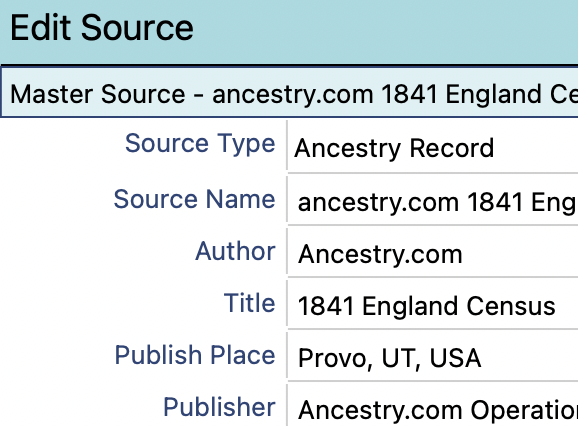
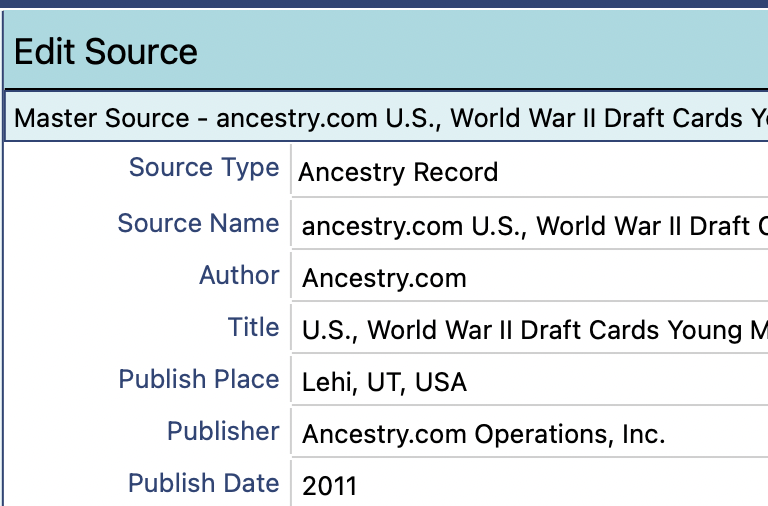
Quote from Kevin McLarnon on 2026-02-12, 8:01 pmJerry, It's the "Publish Place" field of the Ancestry Record Source Template. Hope the hiking was awesome!
Jerry, It's the "Publish Place" field of the Ancestry Record Source Template. Hope the hiking was awesome!
Quote from thejerrybryan on 2026-02-12, 8:23 pmSo it's not in AddressTable. I can handle that data for the CitationTable based on that template. Thanks for the info.
So it's not in AddressTable. I can handle that data for the CitationTable based on that template. Thanks for the info.
Quote from thejerrybryan on 2026-02-12, 11:27 pmI think this will do it. It's based on Kevin's analysis of where the data can be found.
Because the data that needs to be changed is source data rather than citation data, you might have been able to change it fairly easily by hand from the RM UI. It really depends on how many citations use the same source. Potentially, many different citations could be used with the same source.
I have tested as thoroughly as I am able without having your data in hand. Please look at the script before you run it and test it in a test database, make good backups, etc.
I think this will do it. It's based on Kevin's analysis of where the data can be found.
Because the data that needs to be changed is source data rather than citation data, you might have been able to change it fairly easily by hand from the RM UI. It really depends on how many citations use the same source. Potentially, many different citations could be used with the same source.
I have tested as thoroughly as I am able without having your data in hand. Please look at the script before you run it and test it in a test database, make good backups, etc.
Uploaded files:Quote from Jaime Teas on 2026-02-13, 1:22 amJerry and Kevin, the script appears to work perfectly. It helped to merge a lot of duplicate sources. I am still finding some that won't auto merge for different reasons:
- Some have Ancestry.com as the author, some have a blank author
- Some have source descriptions, some do not
I had some minor differences in repositories and I have made the appropriate changes and then merged duplicates, but still some sources that appeared to be identical would not automatically. Next I deleted all of the repositories because I agree with you that who cares where a particular record was found?
So ........ is it possible to delete the Ancestry.com authorship and the description from just the Ancestry.com sources?
Thanks, Jaime
Jerry and Kevin, the script appears to work perfectly. It helped to merge a lot of duplicate sources. I am still finding some that won't auto merge for different reasons:
- Some have Ancestry.com as the author, some have a blank author
- Some have source descriptions, some do not
I had some minor differences in repositories and I have made the appropriate changes and then merged duplicates, but still some sources that appeared to be identical would not automatically. Next I deleted all of the repositories because I agree with you that who cares where a particular record was found?
So ........ is it possible to delete the Ancestry.com authorship and the description from just the Ancestry.com sources?
Thanks, Jaime
Quote from thejerrybryan on 2026-02-13, 11:07 amFor the comments, it's the following. I have removed the filter on Provo and am just testing the template type and whether the comments are already blank or not.
UPDATE SourceTable
SET Comments = ''WHERE SourceTable.SourceID IN
(
SELECT S.SourceID
FROM SourceTable AS S
JOIN SourceTemplateTable AS ST ON ST.TemplateID = S.TemplateID
WHERE ST.Name GLOB 'Ancestry Record'
AND S.Comments != ''
)
For the comments, it's the following. I have removed the filter on Provo and am just testing the template type and whether the comments are already blank or not.
UPDATE SourceTable
SET Comments = ''
WHERE SourceTable.SourceID IN
(
SELECT S.SourceID
FROM SourceTable AS S
JOIN SourceTemplateTable AS ST ON ST.TemplateID = S.TemplateID
WHERE ST.Name GLOB 'Ancestry Record'
AND S.Comments != ''
)
Quote from thejerrybryan on 2026-02-13, 11:28 amFor the author, this should work. However, you might have to play with it a little bit. Both the REPLACE() function and the GLOB operator are case sensitive. So you have to be sure that the way "ancestry.com" is spelled in your database and the way it is spelled in the script are exactly the same, including case, and including no blanks or any other punctuation in the query that doesn't exactly match your database. Also, the string "ancestry.com" appears two places in the script. So if that's not the way you spelled it in your database, you will need to change it both places in the script.
UPDATE SourceTable
SET Fields = (
SELECT CAST(REPLACE(CAST(S.Fields AS TEXT),
'<Field><Name>Author</Name><Value>ancestry.com</Value></Field>',
'<Field><Name>Author</Name><Value></Value></Field>') AS BLOB)
FROM SourceTable AS S WHERE S.SourceID = SourceTable.SourceID
)
WHERE SourceTable.SourceID IN
(
SELECT S.SourceID
FROM SourceTable AS S
JOIN SourceTemplateTable AS ST ON ST.TemplateID = S.TemplateID
WHERE ST.Name GLOB 'Ancestry Record'
AND CAST(S.Fields AS TEXT) GLOB '*<Field><Name>Author</Name><Value>ancestry.com</Value></Field>*'
)
For the author, this should work. However, you might have to play with it a little bit. Both the REPLACE() function and the GLOB operator are case sensitive. So you have to be sure that the way "ancestry.com" is spelled in your database and the way it is spelled in the script are exactly the same, including case, and including no blanks or any other punctuation in the query that doesn't exactly match your database. Also, the string "ancestry.com" appears two places in the script. So if that's not the way you spelled it in your database, you will need to change it both places in the script.
UPDATE SourceTable
SET Fields = (
SELECT CAST(REPLACE(CAST(S.Fields AS TEXT),
'<Field><Name>Author</Name><Value>ancestry.com</Value></Field>',
'<Field><Name>Author</Name><Value></Value></Field>') AS BLOB)
FROM SourceTable AS S WHERE S.SourceID = SourceTable.SourceID
)
WHERE SourceTable.SourceID IN
(
SELECT S.SourceID
FROM SourceTable AS S
JOIN SourceTemplateTable AS ST ON ST.TemplateID = S.TemplateID
WHERE ST.Name GLOB 'Ancestry Record'
AND CAST(S.Fields AS TEXT) GLOB '*<Field><Name>Author</Name><Value>ancestry.com</Value></Field>*'
)
Quote from Jaime Teas on 2026-02-13, 11:48 amWow .... wish I had your brain! both scripts worked, however I misspoke about one thing: The source info that I want to get rid of is not Source Comments, it is Source Text.
Wow .... wish I had your brain! both scripts worked, however I misspoke about one thing: The source info that I want to get rid of is not Source Comments, it is Source Text.