GEDCOM X RS interface to RootsMagic

Quote from Michael Henry on 2026-07-18, 6:34 amHi all,
GEDCOM X RS is the API used by FamilySearch; this is the API RootsMagic will be using to integrate with FamilySearch. I want to go in the other direction - I want to write a client that can call an API and get data from my RootsMagic database. In other words: I want to implement a read-only proxy that will connect to my RootsMagic database to publish my data via a GEDCOM X RS API.
Before I reinvent the wheel: Has anyone done this or seen something that does this?
I'm only planning to implement a small subset of the API, not the full thing.
Thanks,
Michael
Hi all,
GEDCOM X RS is the API used by FamilySearch; this is the API RootsMagic will be using to integrate with FamilySearch. I want to go in the other direction - I want to write a client that can call an API and get data from my RootsMagic database. In other words: I want to implement a read-only proxy that will connect to my RootsMagic database to publish my data via a GEDCOM X RS API.
Before I reinvent the wheel: Has anyone done this or seen something that does this?
I'm only planning to implement a small subset of the API, not the full thing.
Thanks,
Michael
Quote from Tom Holden on 2026-07-18, 7:14 pmYou are the first person I've heard from with the idea you have presented. Very novel, indeed! Good luck with it and do keep us abreast of your major steps in progress.
You are the first person I've heard from with the idea you have presented. Very novel, indeed! Good luck with it and do keep us abreast of your major steps in progress.
Quote from Michael Henry on 2026-07-19, 6:16 amMy project has been published to https://github.com/aviast/rmgedcomx
Beware: I'm not anywhere near a good enough coder to have coded this project this quickly. This has been vibe coded - you have been warned 😀
There are two components to the project:
- A simple server written in Go, and
- An equally simple client written in Python.
The documentation is pretty comprehensive and should allow you to build and run the server without any issues. Once the server is running you can fire up the client and interrogate your RootsMagic database via GEDCOM X RD!
Please play with it and let me know if you have any issues or suggestions.
Regards,
Michael
My project has been published to https://github.com/aviast/rmgedcomx
Beware: I'm not anywhere near a good enough coder to have coded this project this quickly. This has been vibe coded - you have been warned 😀
There are two components to the project:
- A simple server written in Go, and
- An equally simple client written in Python.
The documentation is pretty comprehensive and should allow you to build and run the server without any issues. Once the server is running you can fire up the client and interrogate your RootsMagic database via GEDCOM X RD!
Please play with it and let me know if you have any issues or suggestions.
Regards,
Michael
Quote from chief superintendent on 2026-07-22, 4:12 pmI had to look up "vibe coding" to understand what you meant and realise that I had been doing that with DeepSeek and Gemini to develop SQLite scripts to query RootsMagic last year, some of which were posted on the Blog or in this Forum.
I've yet to look into your RM database client-server system but it sounds very novel!
I had to look up "vibe coding" to understand what you meant and realise that I had been doing that with DeepSeek and Gemini to develop SQLite scripts to query RootsMagic last year, some of which were posted on the Blog or in this Forum.
I've yet to look into your RM database client-server system but it sounds very novel!
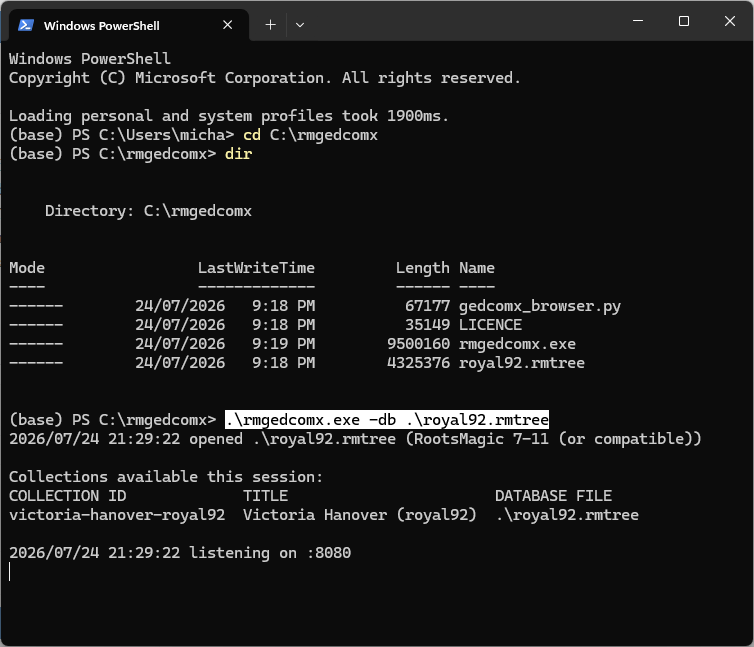
Quote from Michael Henry on 2026-07-24, 7:59 amThe server is written in the Go programming language which requires compilation. Installing go development tools and compiling the code is a big ask of anyone interested in this project, so I've configured GitHub to compile the code and make executables available (for Windows and MacOS). To find these files go to the project on GitHub and look for Releases section on the right side. Click on the version number and find the relevant archive in the Assets table. When you extract the zip file you will see it contains four files:
- gedcomx_browser.py: A GEDCOM X client written in Python
- LICENCE: A copy of the GPLv3 licence
- rmgedcomx.exe: The server
- royal92.rmtree: A sample RootsMagic database
The server must be started from the command line with one or more RootsMagic databases nominated with the "-db" flag:
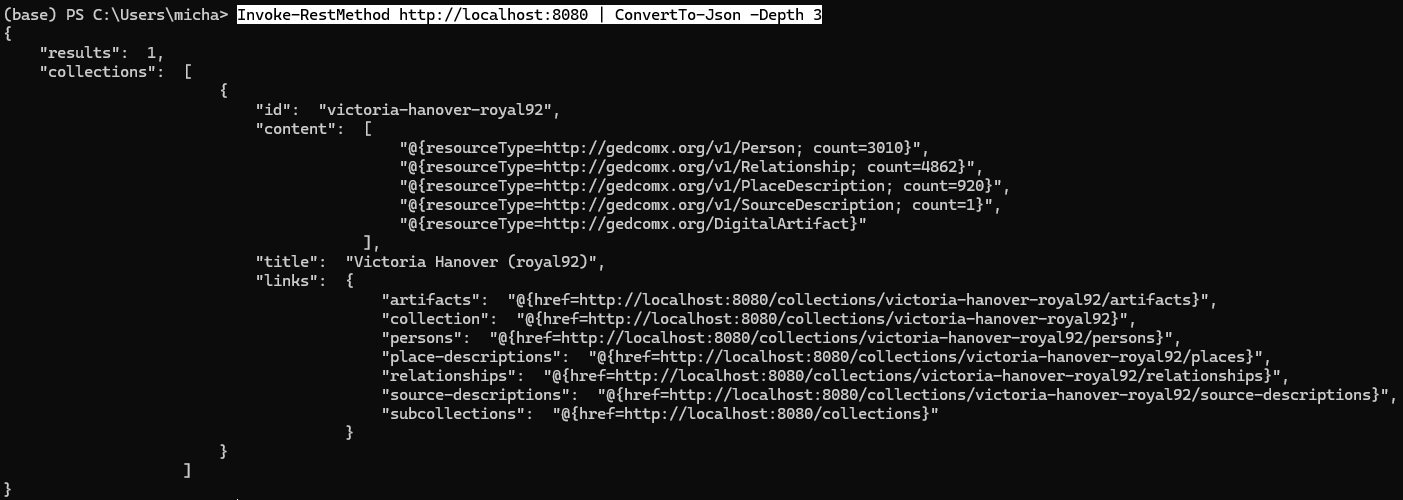
Once the server is listening you can send requests; in the absence of a proper client you can use PowerShell commands (on Windows) or curl (on Apple):
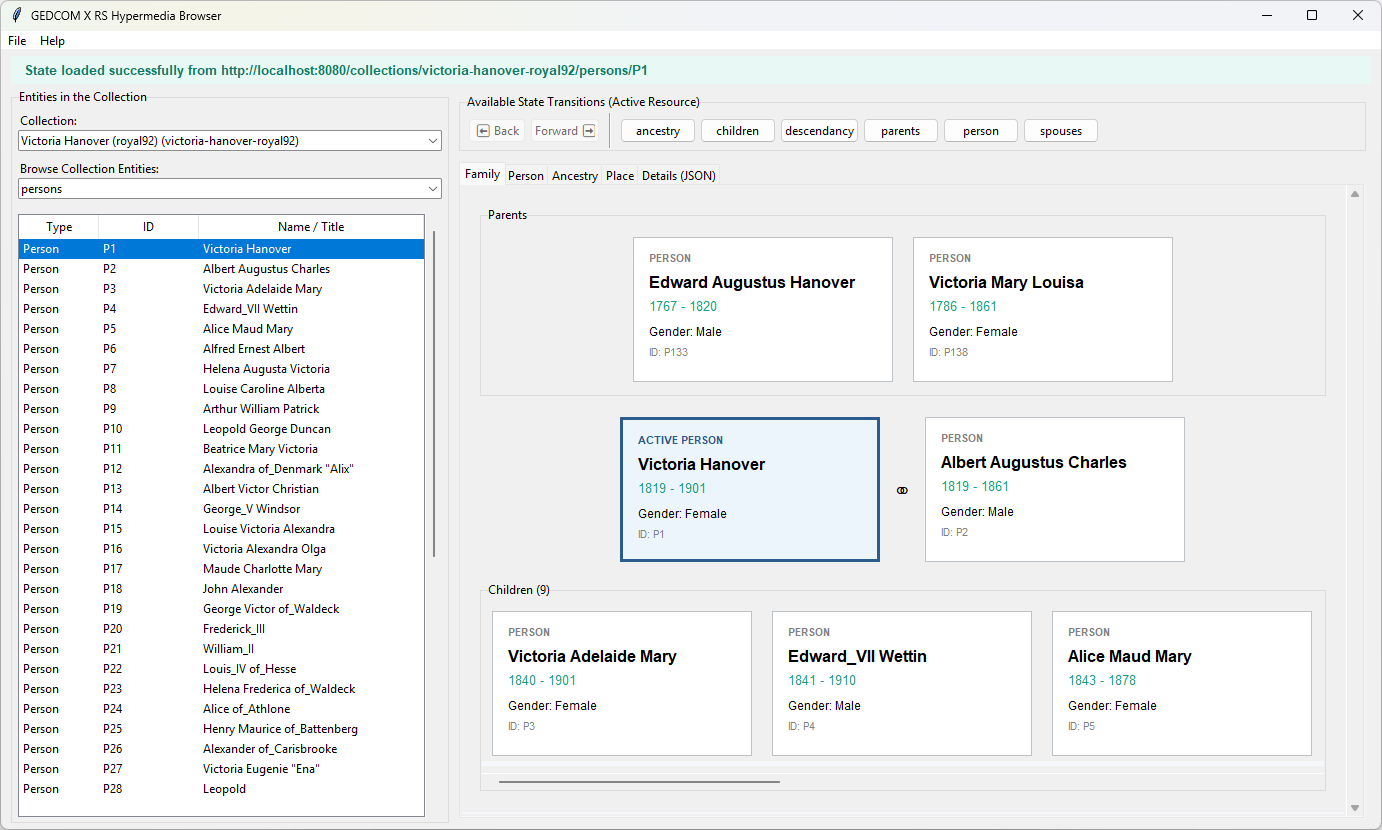
The included Python client requires that Python be installed (turning that into an executable is on my to-do list). If you have Python installed you can start the client with `python gedcomx_browser.py`, and should be able to connect to the server and fetch information:
This server was not my ultimate goal - I want to develop a Digital Asset Management tool that uses this server. But that's for another thread...
The server is written in the Go programming language which requires compilation. Installing go development tools and compiling the code is a big ask of anyone interested in this project, so I've configured GitHub to compile the code and make executables available (for Windows and MacOS). To find these files go to the project on GitHub and look for Releases section on the right side. Click on the version number and find the relevant archive in the Assets table. When you extract the zip file you will see it contains four files:
- gedcomx_browser.py: A GEDCOM X client written in Python
- LICENCE: A copy of the GPLv3 licence
- rmgedcomx.exe: The server
- royal92.rmtree: A sample RootsMagic database
The server must be started from the command line with one or more RootsMagic databases nominated with the "-db" flag:
Once the server is listening you can send requests; in the absence of a proper client you can use PowerShell commands (on Windows) or curl (on Apple):
The included Python client requires that Python be installed (turning that into an executable is on my to-do list). If you have Python installed you can start the client with `python gedcomx_browser.py`, and should be able to connect to the server and fetch information:
This server was not my ultimate goal - I want to develop a Digital Asset Management tool that uses this server. But that's for another thread...
Uploaded files: