Another possible candidate for a substitute collation for RMNOCASE is Nunicode. It would have to be compiled into a DLL as a loadable extension for use with certain SQLite managers or incorporated into a custom SQLite application.
SQLite Tools for RootsMagic
Exploit your RootsMagic family tree database with SQLite Tools
Group – Unconnected Persons #namedgroup
Problem
I have some experience with SQL but would like to create a query that would create a named group of Orphans that would contain the people in the file that have no parents, spouses, or children. These people are most likely remnants from deleting trees in my old program that I used. Another reason is that one of my gedcoms had family information missing so the entire file imported as individuals that were unconnected.
In the sample file there is only one orphaned person in the file. In my personal file there are actually hundreds of them. Since the file is large, I would like to be able to run the query that would update the named group as I work through merging two large files (over 300,000 people) so I can try to keep track of who is still orphaned in the tree.
A Solution
This approach involves two steps of development:
- Script to store the RIN (PersonID) of these so-called “Orphans” in a temporary table
- Script to create/update a Named Group from the temp table
They are combined into a single script downloadable from the bottom of the page. It is efficient: in a database of 160,000 people, it created a group of the 1000 unconnected persons in ~3 seconds. It takes longer than that for RootsMagic to initially display the group in the sidebar; People View displays the group very quickly.
A message about this solution has been posted to the RootsMagic Forums at http://forums.rootsmagic.com/index.php?/topic/13326-dynamic-group-for-unconnected-persons/.
The “Orphans” Table
-- Persons-NoParentNoSpouseNoChild.sql
/*
2014-01-23 Tom Holden ve3meo
2014-01-24 rev changed table name to more generic

Creates a temporary table xGroupTempTable of PersonIDs (RINs)
of those who have neither a parent nor a spouse nor a child.
To be used with another procedure to update a named group.
*/
DROP TABLE
IF EXISTS xGroupTempTable;

CREATE TEMP TABLE
IF NOT EXISTS xGroupTempTable AS
    SELECT *
    FROM (
        --- Persons not in FamilyTable, either no spouse or no child
        SELECT PersonID
        FROM PersonTable

        EXCEPT

        SELECT *
        FROM (
            SELECT FatherID AS PersonID
            FROM FamilyTable

            UNION

            SELECT MotherID AS PersonID
            FROM FamilyTable
            )
        ) NATURAL
    INNER JOIN (
        -- persons with no parent
        SELECT PersonID
        FROM PersonTable

        EXCEPT

        SELECT ChildID
        FROM ChildTable
        );
Try the above script. Examine the temp table and look up some persons identified therein using RootsMagic to confirm that it is working as expected.
The “Orphans” Named Group
This script was extracted and adapted to work with the above script from Group – Persons with Text Dates. It creates and maintains a RM Group named “SQL: Unconnected Persons” from the temporary table xGroupTempTable.
After running this script with RootsMagic open simultaneously on the same database, it is necessary to refresh the Sidebar Group display. One does so by selecting a different group and re-selecting “SQL: Unconnected Persons”. Unfortunately, if this is the only group in the Groups list, you may have to close and reopen the database to refresh the list of members.
-- Group-UnconnectedPersons.sql
/*
2014-01-24 Tom Holden ve3meo
Creates and updates a named group of persons
having no parent, no spouse, nor a child in the database
from a temp table xGroupTempTable created by another script
*/
-- Create Named Group if it does not exist 'SQL: Unconnected Persons'
INSERT
    OR IGNORE
INTO LabelTable
VALUES (
    (
        SELECT LabelID
        FROM LabelTable
        WHERE LabelName LIKE 'SQL: Unconnected Persons'
        )
    ,0
    ,(
        SELECT ifnull(MAX(LabelValue), 0) + 1
        FROM LabelTable
        ) -- ifnull() needed if LabelTable is empty
    ,'SQL: Unconnected Persons'
    ,'SQLite query'
    );

-- Delete all members of the named group
DELETE
FROM GroupTable
WHERE GroupID = (
        SELECT LabelValue
        FROM LabelTable
        WHERE LabelName LIKE 'SQL: Unconnected Persons'
        );

-- Add members to the named group
INSERT INTO GroupTable
SELECT NULL
    ,(
        SELECT LabelValue
        FROM LabelTable
        WHERE LabelName LIKE 'SQL: Unconnected Persons'
        )
    ,PersonID AS StartID
    ,PersonID AS EndID
FROM (
    SELECT DISTINCT PersonID
    FROM xGroupTempTable
    );
Download complete script
This file combines the two scripts into one so that a single pass takes care of updating the group. Group-UnconnectedPersons.sql
Discussions & comments from Wikispaces site
Comment: “keep track of who is still orphaned”
03 September 2018 21:24:57
ve3meo Jan 22, 2014
Have you tried RM’s Tools > Count Trees function? Each orphan will be listed as a tree with a Count of 1 and the Start Person will be the orphan.
mom2twinzz Jan 22, 2014
Yes. However, since I am dealing with potentially hundreds of these orphans, grouping them is more helpful than having the tree finder find each tree each and every time I am trying to connect a person.
What happened is that I had a computer malfunction that apparently truncated my gedcom from Legacy family tree. I no longer have the original LFT file, so direct importing the file into RM is impossible. Looking at a tree count, I have over 11,000 trees more than 10000 are orphaned trees, but that have information that I still want to merge in. Automatic merging has failed since the information was conflicting (middle names exist in one file but not the other, etc.) and failed to merge most of the people. So I am forced to manually merge people. Having a named group of orphans helps me to keep track of where I am in the merge process.
Facts – Reference Numbers for person, spouse and parents. #facttypes #events #refno
Purpose
This page responds to a request posted in the RootsMagic Forums by Forum member JoyceAE5 on 21 Jan 2014.
Basically, what I want is a list of everyone in my database with the following information:

Person's RefNo, Person's Name, Spouse's RefNo, Spouse's Name, Father's RefNo, Father's Name, Mother's RefNo & Mother's Name
Building Blocks
List of RINs and Names
It’s easy enough to get every person’s RIN and Name:
SELECT Per.PersonID AS "RIN"
    ,UPPER(Nam.Surname) || ' ' || Nam.Suffix || ', ' || Nam.[Prefix] || ' ' || Nam.Given AS
    "Name"
FROM PersonTable Per
INNER JOIN NameTable Nam ON Per.PersonID = Nam.OwnerID
    AND +Nam.IsPrimary -- excludes Alternate Names;
Sample results:
RIN Name
...
286 CLENDENON , Magdalena
287 HOLDEN , Abigal
288 HOLDEN , Barbery
289 MCDONALD , Samuel Charles
...
List of RINs and RefNos
What about each Person’s RefNo value?
SELECT Per.PersonID AS "RIN"
    ,CAST(Evt.Details AS TEXT) AS "RefNo"
FROM PersonTable Per
LEFT JOIN EventTable Evt ON Per.PersonID = Evt.[OwnerID]
    AND Evt.EventType = 35 -- the FactTypeID for the Reference Number fact is 35
    AND Evt.OwnerType = 0
    -- restricts to events for individuals; redundant in this case because the FactType is so restricted
    ;
which gives:
RIN    RefNo
...
328    Groves340
329    Groves284
329    HLAF139
330
...
Note that RIN 329 has two RefNo and 330 has none. If many persons have two or more RefNos, the number of combinations reported will go up exponentially; if a person, her spouse and her parents all have two RefNos, that person will be listed 16 times (2^4).
Combine two lists into a lookup table
Since we want the RefNo and Name for each Person, his spouse and parents, it would be most efficient to combine these results in a single lookup table so that the processing need not be repeated for each person and these relatives. That’s achieved by JOINing the two queries on the common field, RIN and storing a query of the results to a temporary table:
DROP TABLE IF EXISTS xNamesRefNoTable;

CREATE TEMP TABLE IF NOT EXISTS xNamesRefNoTable AS
    SELECT *
    FROM (
        SELECT Per.PersonID AS RIN
            ,UPPER(Nam.Surname) || ' ' || Nam.Suffix || ', ' || Nam.[Prefix] || ' ' || Nam.
            Given || ' -' || Per.PersonID AS NAME
        FROM PersonTable Per
        INNER JOIN NameTable Nam ON Per.PersonID = Nam.OwnerID
            AND + Nam.IsPrimary -- excludes Alternate Names;
        ) NATURAL
    INNER JOIN (
        SELECT Per.PersonID AS RIN
            ,CAST(Evt.Details AS TEXT) AS RefNo
        FROM PersonTable Per
        LEFT JOIN EventTable Evt ON Per.PersonID = Evt.[OwnerID]
            AND Evt.EventType = 35
            -- the FactTypeID for the Reference Number fact is 35
            AND Evt.OwnerType = 0
            -- restricts to events for individuals; redundant in this case because the FactType is so restricted
        );
Sample from this table, displayed as tab-delimited:
RIN    NAME    RefNo
66    FITCHETT Sr., U.E.,  Joseph -66    Groves073
66    FITCHETT Sr., U.E.,  Joseph -66    HLAF337
67    MCARTHUR ,  Nancy Ann -67    Groves074
68    FITCHETT ,  Dennis -68    Groves075
68    FITCHETT ,  Dennis -68    HLAF361
Note that the RIN has also been appended to the Name for convenience.
Report Query
Now to put together the Person, Spouse and Parents. I’m leaping to a complete report query that uses the temporary table created above, rather than building it up piece-meal. If you examine it from the inside out, you will see how it builds up a query listing the RINs of the person, spouse, father and mother. Then the temporary table is looked up from each RIN to retrieve the corresponding RefNo and Name.
SELECT RINS.RIN
    ,Person.[RefNo]
    ,Person.[NAME]
    ,Spouse.[RefNo]
    ,Spouse.[NAME]
    ,Father.[RefNo]
    ,Father.[Name]
    ,Mother.[RefNo]
    ,Mother.NAME
FROM (
    SELECT Pert.PersonID AS RIN
        ,Spouses.SpouseID
        ,Parents.[FatherID]
        ,Parents.MotherID
    FROM PersonTable Pert
    LEFT JOIN (
        -- Get RIN of Spouse (MotherID)
        SELECT Per.PersonID AS RIN
            ,Fam.[MotherID] AS SpouseID
        FROM PersonTable Per
        INNER JOIN FamilyTable Fam ON Per.PersonID = Fam.[FatherID]

        UNION

        -- Get RIN of Spouse (FatherID)
        SELECT Per.PersonID AS RIN
            ,Fam.[FatherID] AS SpouseID
        FROM PersonTable Per
        INNER JOIN FamilyTable Fam ON Per.PersonID = Fam.[MotherID]
        ) AS Spouses ON Pert.[PersonID] = Spouses.RIN
    LEFT JOIN (
        -- Get RINs of Parents
        SELECT Per.PersonID AS RIN
            ,Fam.[FatherID]
            ,Fam.[MotherID]
        FROM PersonTable Per
        LEFT JOIN ChildTable Child ON Per.PersonID = Child.[ChildID]
        INNER JOIN FamilyTable Fam USING (FamilyID)
        ) AS Parents ON Pert.[PersonID] = Parents.RIN
    ) AS RINS NATURAL
INNER JOIN xNamesRefNoTable AS Person
LEFT JOIN xNamesRefNoTable AS Spouse ON RINS.SpouseID = Spouse.[RIN]
LEFT JOIN xNamesRefNoTable AS Father ON FatherID = Father.[RIN]
LEFT JOIN xNamesRefNoTable AS Mother ON MotherID = Mother.[RIN];
Sample output
| RINS.RIN | Person.[RefNo] | Person.[NAME] | Spouse.[RefNo] | Spouse.[NAME] | Father.[RefNo] | Father.[Name] | Mother.[RefNo] | Mother.Name |
| 917 | HLAF061 | HARTLEY , Florence -917 | HLAF102 | BLAKESTON , Sidney -918 | HLAF039 | HARTLEY , Rev. George -875 | HLAF040 | COWIESON , Annetta Jane -876 |
| 918 | HLAF102 | BLAKESTON , Sidney -918 | HLAF061 | HARTLEY , Florence -917 | ||||
| 919 | HLAF103 | BLAKESTON , Zella -919 | HLAF102 | BLAKESTON , Sidney -918 | HLAF061 | HARTLEY , Florence -917 |
Download Final Script
The whole script combining all the queries can be run in one fell swoop. Download it here: Facts-RefNos_person_spouse_parents.sql
Privatize Living #private #reports #gedcom
This script sets private the events, alternate name facts, and personal notes for persons whose Living flag is set. Thus, reports and GEDCOM can take full advantage of the options:
- Privatize living people (GEDCOM only)
- Include private facts
- Include {private} notes
- Strip { } brackets
thus providing many more combinations by which these outputs may be tailored.
This is a first pass script, lightly tested so use the usual precautions and feedback any problems. There is a known problem with privatizing notes that are already privatized – RM may output a closing brace character “}”.
-- PrivatizeLiving.sql
/* 2013-12-14 Tom Holden ve3meo
Privatizes events, alt names, personal notes for persons with Living flag set
so that reports can be made with names of living persons but no details while
full details are outputted for the deceased.

To Do: privatize family note when one spouse is Living.

N.B.: There is a series of queries in a comment block at the end which can be run
to UNDO the privatization, it is nevertheless advisable to run this script against
a copy of your database in case the process is not perfectlt reversible. Of course,
you may wish to keep the resulting privatization if it suits your purposes so that
reversal is unnecessary.
*/

-- Make a table of persons marked Living
DROP TABLE IF EXISTS xLivingTable
;
CREATE TEMP TABLE IF NOT EXISTS xLivingTable
AS
SELECT PersonID, Note, TRIM(CAST(Note AS TEXT)) AS NoteTxt FROM PersonTable WHERE Living
;

-- Make a backup table of EventIDs and their IsPrivate setting
-- for all persons marked Living; must cover individual and family events
DROP TABLE IF EXISTS xLivingEventsBak
;
CREATE TABLE IF NOT EXISTS xLivingEventsBak
AS
SELECT E.EventID, E.IsPrivate FROM EventTable E  -- Individual events
INNER JOIN xLivingTable Lv ON E.OwnerID = Lv.PersonID AND E.OwnerType = 0
UNION
SELECT E.EventID, E.IsPrivate FROM EventTable E  -- Spousal events for living husband
INNER JOIN FamilyTable Fm ON E.OwnerID = Fm.FamilyID AND E.OwnerType = 1
INNER JOIN xLivingTable Lv ON Fm.FatherID = Lv.PersonID
UNION
SELECT E.EventID, E.IsPrivate FROM EventTable E  -- Spousal events for living wife
INNER JOIN FamilyTable Fm ON E.OwnerID = Fm.FamilyID AND E.OwnerType = 1
INNER JOIN xLivingTable Lv ON Fm.MotherID = Lv.PersonID
;

-- SET EventTable.IsPrivate = 1 for all events in xLivingEventsBak
UPDATE EventTable
SET IsPrivate = 1
WHERE EventID IN
(SELECT DISTINCT EventID FROM xLivingEventsBak WHERE NOT IsPrivate ORDER BY EventID)
;


/*
-- Alternate Names can also be set private and perhaps desirably so so we repeat
the pattern above
*/
-- Make a backup table of non-primary NameIDs and their IsPrivate setting
-- for all persons marked Living;
DROP TABLE IF EXISTS xLivingNamesBak
;
CREATE TABLE IF NOT EXISTS xLivingNamesBak
AS
SELECT NameID, IsPrivate FROM NameTable
WHERE OwnerID IN
(SELECT PersonID FROM xLivingTable)
ORDER BY NameID
;

-- Privatize Alternate Names for Persons marked Living in the database
UPDATE NameTable SET IsPrivate = 1
WHERE NameID IN
(
 SELECT NameID FROM xLivingNamesBak WHERE NOT IsPrivate
)
;


-- PRIVATIZE Personal Notes for persons marked Living by enclosing in braces {}
UPDATE PersonTable
SET Note =
--SELECT
CAST(REPLACE(CAST(Note AS TEXT), CAST(Note AS TEXT), '{' || CAST(Note AS TEXT) || '}') AS BLOB)
--FROM PersonTable
WHERE PersonID
IN (SELECT PersonID FROM xLivingTable WHERE NoteTxt NOT LIKE '{%}')
;

/*
-- BLOCK OF UNDO queries to reverse the above changes.

-- UNDO Privatize events by SET EventTable.IsPrivate = 0 for all events in
  xLivingEventsBak that have IsPrivate = 0
UPDATE EventTable
SET IsPrivate = 0
WHERE EventID IN
(SELECT DISTINCT EventID FROM xLivingEventsBak WHERE NOT IsPrivate ORDER BY EventID)
;

-- UNDO privatization of Alt Names for Living persons
UPDATE NameTable SET IsPrivate = 0
WHERE NameID IN
(
 SELECT NameID FROM xLivingNamesBak WHERE NOT IsPrivate
)
;

-- UNDO Privatize Personal Notes by updating from xLivingTable
UPDATE PersonTable
SET Note =
(SELECT Note FROM xLivingTable Lv WHERE PersonTable.PersonID = Lv.PersonID)
WHERE PersonID
IN (SELECT PersonID FROM xLivingTable WHERE NoteTxt NOT LIKE '{%}')
;
*/
-- END of script
An Example of Using SQLite Views #views #colorcoding
I thought I would post some results from a little project I’ve recently been working on. Consider a descendant narrative report in RM in any of the supported formats: outline, NEHGS, etc. In any of these reports, the parents of the spouses will be listed as a part of the birth sentence for the spouse, viz. “Jane Doe, daughter of John Doe and Sarah Smith, was born in 1848″. My project has been to assure that I have all the appropriate data and documentation for the parents, even though the data itself will not appear in this particular report except for the names of the parents.
My strategy is to color code such parents of spouses using navy as the color. Navy is not otherwise used as a color in my database. I can then do searches for individuals who are colored navy or make a Named Group out of them or whatever. In other words, I use my set of navy people as sort of a “to do list” for my research.I should explain that I have a Named Group in my database called Active_Research consisting of all the individuals who I am most actively working on. Everybody in my Active_Research group is color coded green and everybody who is color coded green is in my Active_Research group.
So suppose I want to color code as navy all the parents of the spouses of the descendants of John Doe, and by the way John Doe and all his descendants and their spouses are already color coded green and are already in the Active_Research group. So in RM, I do the following.
- Color code John Doe and all his descendants and spouses as teal. This temporarily disturbs their normal green color, but I will restore the green before I’m done. And just like navy, teal normally is never used anywhere in my database.
- Color code John Doe and all his descendants but not their spouses as green.
At this point, the direct descendants of John Doe have been restored to green, and the spouses have been colored as teal. So I need to color code the parents of all the teal people as navy, and then restore the teal people to green. I will then have restored all my green people to green, and will have color coded all the parents of the spouses of John Doe’s descendants as navy.
It’s trivial to restore the teal people to green from within RM, but before I do I need to color the parents of all the teal people as navy using SQLite scripts. The script to do so is included below. In order to accomplish the desired processing, I experimented with the idea of using views – something I had never done before in SQLite although I had used views before in other SQL environments.
My SQL tends to use lots of subqueries – probably many more than most people would use. It’s just my style, I guess. And I was thinking that all my subqueries might be a lot easier to develop, debug, and manage if they were views than if they were true subqueries.
To tell you the truth, I sort of went overboard. Because I usually code with lots of subqueries, when I replaced the subqueries with views I ended up with lots of views. Some of my views could have been combined, but splitting the views down into as many small pieces as I did made them really easy to develop.
The process of using views proved to be extremely easy. For each view, I would develop it and debug it as a standard query (not as a subquery). Once it was working, all I had to do to convert the query to a view was to precede it with a CREATE VIEW statement. I used CREATE TEMP VIEW to avoid storing the views themselves in my RM database.
If you look at my script, the first SQL statement that really does any processing of my RM database is the UPDATE statement itself. Within the UPDATE statement, there is a subquery which says “SELECT ParentID AS PersonID from ParentView”. ParentView is one of the views I created, and the reference to ParentView kicks off a whole chain of references to all the other views I created. A possible alternative coding style might have been an UPDATE statement that was 15 or 20 lines long with nested subquery on top of nested subquery. All that nested subquery stuff is still really happening, but it’s hidden in all the nested views.
By the way, I really wanted my UPDATE statement simply to say UPDATE ParentView SET COLOR = 10. Such a statement makes perfectly good sense to me, but you can’t update a view. So I had to update an RM table and move the reference to ParentView into a subquery.
Jerry
DROP VIEW IF EXISTS ChildView;
DROP VIEW IF EXISTS TealView;
DROP VIEW IF EXISTS FamilyView;
DROP VIEW IF EXISTS MotherView;
DROP VIEW IF EXISTS FatherView;
DROP VIEW IF EXISTS ParentView;

CREATE TEMP VIEW ChildView AS   -- View to produce the RIN and FamilyID of everyone who has parents
SELECT C.ChildID,
       C.FamilyID
FROM ChildTable AS C
ORDER BY C.ChildID;

CREATE TEMP VIEW TealView AS    -- View to produce the RIN of everyone who is colored Teal
SELECT P.PersonID
FROM PersonTable AS P
WHERE Color = 13                -- color is teal
ORDER BY P.PersonID;

CREATE TEMP VIEW FamilyView AS  -- View to produce the RIN and FamilyID of everyone who has parents and is colored teal
SELECT N.PersonID, C.FamilyID
FROM TealView AS N
       INNER JOIN
     ChildView AS C ON C.ChildID = N.PersonID
ORDER BY FamilyID;

CREATE TEMP VIEW MotherView AS  -- View to produce the RIN of the mother of everyone who has parents and is colored teal
SELECT F.MotherID AS ParentID
FROM FamilyTable AS F
        INNER JOIN
     FamilyView AS G ON F.FamilyID = G.FamilyID
ORDER BY F.MotherID;

CREATE TEMP VIEW FatherView AS  -- View to produce the RIN of the father of everyone who has parents and is colored Teal
SELECT F.FatherID AS ParentID
FROM FamilyTable AS F
        INNER JOIN
     FamilyView AS G ON F.FamilyID = G.FamilyID
ORDER BY F.FatherID;

CREATE TEMP VIEW ParentView AS  -- View to produce the RIN of the parents of everyone who has parents and is colored Teal
SELECT ParentID FROM MotherView AS ParentID
    UNION
SELECT ParentID FROM FatherView AS ParentID
ORDER BY ParentID;

UPDATE PersonTable SET Color = 10 WHERE PersonTable.PersonID IN (SELECT ParentID AS PersonID FROM ParentView); -- Update parents of Teal people to be Navy people

SELECT * FROM PersonTable WHERE Color = 10;   -- Display the Navy people, Teal people will be restored to Green back in RM
Places without Geo-codes for Named Groups #places #placedetails #geocoding #namedgroup
It is daunting to work through the Place List, finding Places and Place Details (sites) that need to be geo-coded (i.e., have latitude and longitude values entered) so that they can be readily mapped and their events included in the Place List report option “Print events near a place”. The larger the database of persons and families, invariably the more places and sites and the bigger the challenge. RootsMagic features such as Color Coding and Named Groups help narrow the focus when working on the facts for people and families of primary interest but, as of version 6, do nothing for the Place List. A desirable enhancement would provide the option to filter the Place List to include only those places and sites used by events for persons and families in a given color code or named group. Moreover, other filters would be helpful, such as showing only those lacking coordinates, or containing some string in any of the fields, etc., i.e., something paralleling RM Explorer for people.
This query provides an interim aid for the specific task of finding non-geo-coded places and sites used by the facts for a subset of the people and families in the database. It lists those places and sites for persons in one or more named groups whose group name contains the string “focus”. One would work within the RootsMagic Place List to go directly to these and assign coordinates using its Geo-code and Online Map functions or other resources such as Wikipedia, Google Maps and Google Earth.
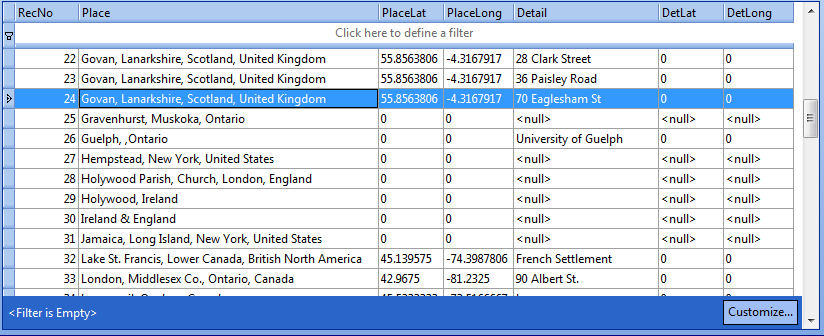 |
| Screenshot from SQLite Expert of query results showing places and sites, either or both of which lack geographical coordinates. |
In the above screenshot, there are 10 different places listed from RecNo 24 to 33. In the RM Place List, 10 places, starting at Govan, Lanarkshire, all begin with “G”. Thus we have skipped those that are not of primary interest.
PlacesWithoutGeocodesForGroup.sql
-- PlacesWithoutGeocodesForGroup.sql
-- 2013-10-21 Tom Holden ve3meo
/*
Lists those places and place details (sites) and their geographical coordinates (geocodes)
for events of persons who are members of named groups having a groupname containing the string
"focus" and for which one of the sets of coordinates is 0 (i.e., not geocoded).
*/
SELECT P.NAME AS Place
    ,P.Latitude * 0.0000001 AS PlaceLat
    ,P.Longitude * 0.0000001 AS PlaceLong
    ,PD.NAME AS Detail
    ,PD.[Latitude] * 0.0000001 AS DetLat
    ,PD.[Longitude] * 0.0000001 AS DetLong
FROM PlaceTable P
LEFT JOIN PlaceTable PD ON P.PlaceID = PD.MasterID
WHERE ifnull(PD.PlaceType, 2) = 2
    AND P.PlaceType = 0
    AND (
        (
            P.Latitude = 0
            AND P.Longitude = 0
            )
        OR (
            PD.Latitude = 0
            AND PD.Longitude = 0
            )
        )
    AND P.PlaceID -- restrict to places used by events for persons in named group
    IN (
        SELECT DISTINCT PlaceID
        FROM (
            SELECT OwnerID AS PersonID
                ,EventID
                ,PlaceID
                ,SiteID
            FROM EventTable E
            WHERE OwnerType = 0

            UNION

            SELECT FatherID AS PersonID
                ,EventID
                ,PlaceID
                ,SiteID
            FROM EventTable E
            INNER JOIN FamilyTable FM ON E.OwnerID = FM.FamilyID
            WHERE OwnerType = 1

            UNION

            SELECT MotherID AS PersonID
                ,EventID
                ,PlaceID
                ,SiteID
            FROM EventTable E
            INNER JOIN FamilyTable FM ON E.OwnerID = FM.FamilyID
            WHERE OwnerType = 1
            )
        WHERE PersonID IN (
                SELECT DISTINCT P.PersonID
                FROM PersonTable P
                    ,GroupTable
                WHERE P.PersonID BETWEEN StartID
                        AND EndID
                    AND GroupID IN (
                        SELECT DISTINCT LabelValue
                        FROM LabelTable
                        WHERE LabelType = 0
                            AND LabelName LIKE '%focus%'
                        ) -- persons in groups with name containing "focus"
                )
        )
    AND (
        PD.PlaceID IsNull -- Places with no PlaceDetail
        OR PD.PlaceID -- OR restrict to sites used by events by persons in named group
        IN (
            SELECT DISTINCT SiteID
            FROM (
                SELECT OwnerID AS PersonID
                    ,EventID
                    ,PlaceID
                    ,SiteID
                FROM EventTable E
                WHERE OwnerType = 0

                UNION

                SELECT FatherID AS PersonID
                    ,EventID
                    ,PlaceID
                    ,SiteID
                FROM EventTable E
                INNER JOIN FamilyTable FM ON E.OwnerID = FM.FamilyID
                WHERE OwnerType = 1

                UNION

                SELECT MotherID AS PersonID
                    ,EventID
                    ,PlaceID
                    ,SiteID
                FROM EventTable E
                INNER JOIN FamilyTable FM ON E.OwnerID = FM.FamilyID
                WHERE OwnerType = 1
                )
            WHERE PersonID IN (
                    SELECT DISTINCT P.PersonID
                    FROM PersonTable P
                        ,GroupTable
                    WHERE P.PersonID BETWEEN StartID
                            AND EndID
                        AND GroupID IN (
                            SELECT DISTINCT LabelValue
                            FROM LabelTable
                            WHERE LabelType = 0
                                AND LabelName LIKE '%focus%'
                            ) -- persons in groups with name containing "focus"
                    )
            )
        )
ORDER BY Place
    ,Detail;
MapEvents-KML query #googlemaps #places #placedetails #geocoding #events
Description
This query helps you plot events from your RootsMagic database on Google Maps, Google Earth, and Bing Maps, provided there are geo-coded Places and Place Details (sites) in your database. It generates results in the Keyhole Markup Language (KML) that can be pasted into a KML shell file and then imported into these mapping services. Google Maps provides the most useful display but the KML file must be stored on a network server (could be a HTTP server on your local computer). Using their respective API or SDK interface would provide superior results from all three but that is beyond my capability. 2020-05-18 there no longer seems to be a way to convey or overlay a collection of points in a XML/XMZ file to Google Maps and Bing Maps; however, ArcGis and OpenStreetMaps are possibilities.
Google Maps
Preserved here to appreciate what once was possible…
 |
| Example showing Placemark callout for the event selected in the sidebar, corresponding to the record highlighted in the SQLiteSpy screenshot below. The underline signifies the coordinates are for the Place Detail (Site). |
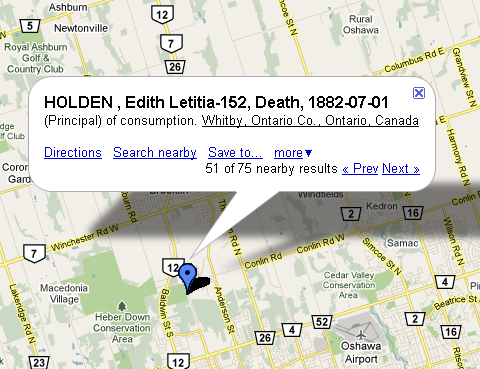 |
| Example of Google Maps callout when a placemark is clicked that has multiple events with the same coordinates. |
Click on this link to view the file that populated the Google Map above: MapEvents.kml
Copy and paste its URL into the Google Maps Search form to view on Google Maps: http://sqlitetoolsforrootsmagic.com/wp-content/uploads/2019/01/MapEvents.kml
Right-click and Save (download) this file to your local drive to import into Bing Maps and Google Earth.
Download Query
Download this query to run on your data: MapEvents-KML.sql
Be sure to change the parameters in the query to suit your requirements. If your data has no events in the Oshawa area before about 1902, my parameters will find nothing!
Copy and paste the results of the query into this shell where instructed using a text editor and save as a .kml file: MapEvents-shell.kml
N.B.: you must restrict the number of Placemarks to 200 or fewer in your KML file.
 |
| Screenshot of SQLiteSpy after running query that produced the Placemarks for the KML file on this page. |
Google Earth
If the Wikispaces server issued the proper mime type for a KML file and Google Earth is installed on your machine, clicking on: MapEvents.kml would launch Google Earth with these Placemarks imported. As it does not, you have to download the file to your local drive, open Google Earth and import the file from your drive.
Bing Maps
Preserved here to appreciate what once was possible…
The ability to use with Bing Maps a KML or KMZ file or any collection of points in a file has disappeared completely. That the URL reported below worked when the Import control had already disappeared must have been during the transition from full support to none. Tom Holden, 2020-05-18.
Since this page was first authored, I have learned that one can pass the KML file to Bing Maps without having to download and import. In fact, the Import function has disappeared from where it was. Now (and maybe then, too), one can pass the URL of the KML file to Bing Maps in this fashion:
http://www.bing.com/maps/default.aspx?mapurl=URLofKMLfile
For example, this URL should open Bing Maps with the above referenced KML file that we have seen in Google Maps and Google Earth and result in a display similar to this screenshot:
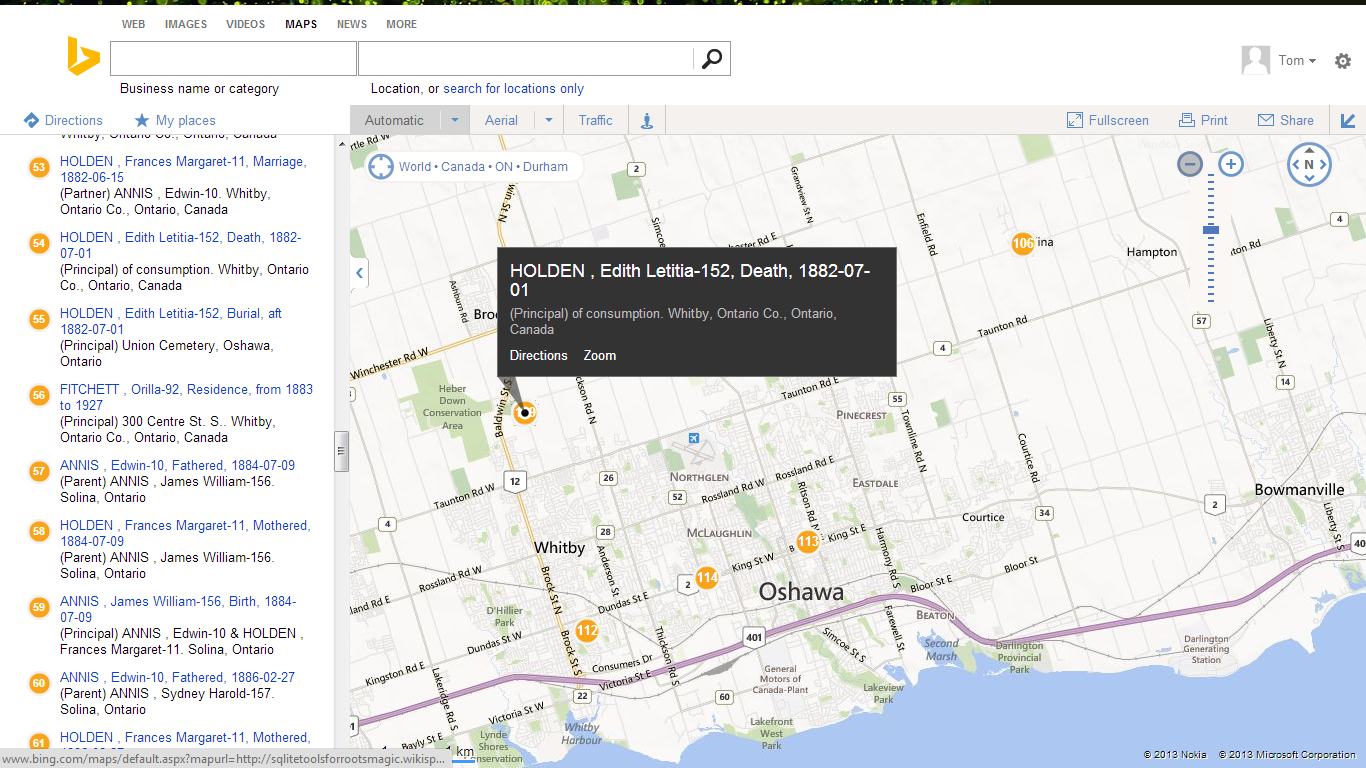
Each RootsMagic event is numbered uniquely. The number inside the place mark is, I think, that of the highest numbered event in that location. Hovering over an event in the list pops up a small title label beside its location on the map. While the Google products enable you to browse all the events in a place, Bing does not directly although one could sort them by place and scroll through while hovering. However, that hover/scroll feature might also be used to advantage with other sort orders – e.g., by person and date; with Google, it would be very clicky traversing a person’s events but with Bing, just hover down the list, clicking only on those where the description is needed.
GeoCommons now ArcGis.com
It appears that the GeoCommons online mapping service was discontinued in or around 2014. There is a possibly related service at ArcGis.com with a free, public tier. (2019-01-27 TH) ArcGis can only import a zipped shapefile (ZIP), a table (CSV), a GPS Exchange Format (GPX), or a GeoJSON file. Support for the CSV format should be a fairly easy adaptation of the script MapEvents-KML.sql.
Preserved here to appreciate what once was possible…
This was an earlier discovery that I never explored very far, perhaps because it did not support KML at the time. Now it does and one need simply place the URL of the KML file in a form. While I am disappointed with its labelling and listing capabilities, it offers other useful features including conversion between data formats, e.g., upload CSV and download KML or vice versa. And it also does geocoding worldwide with finer resolution for USA, down to street address level. Here’s an example of the same KML file rendered in geocommons: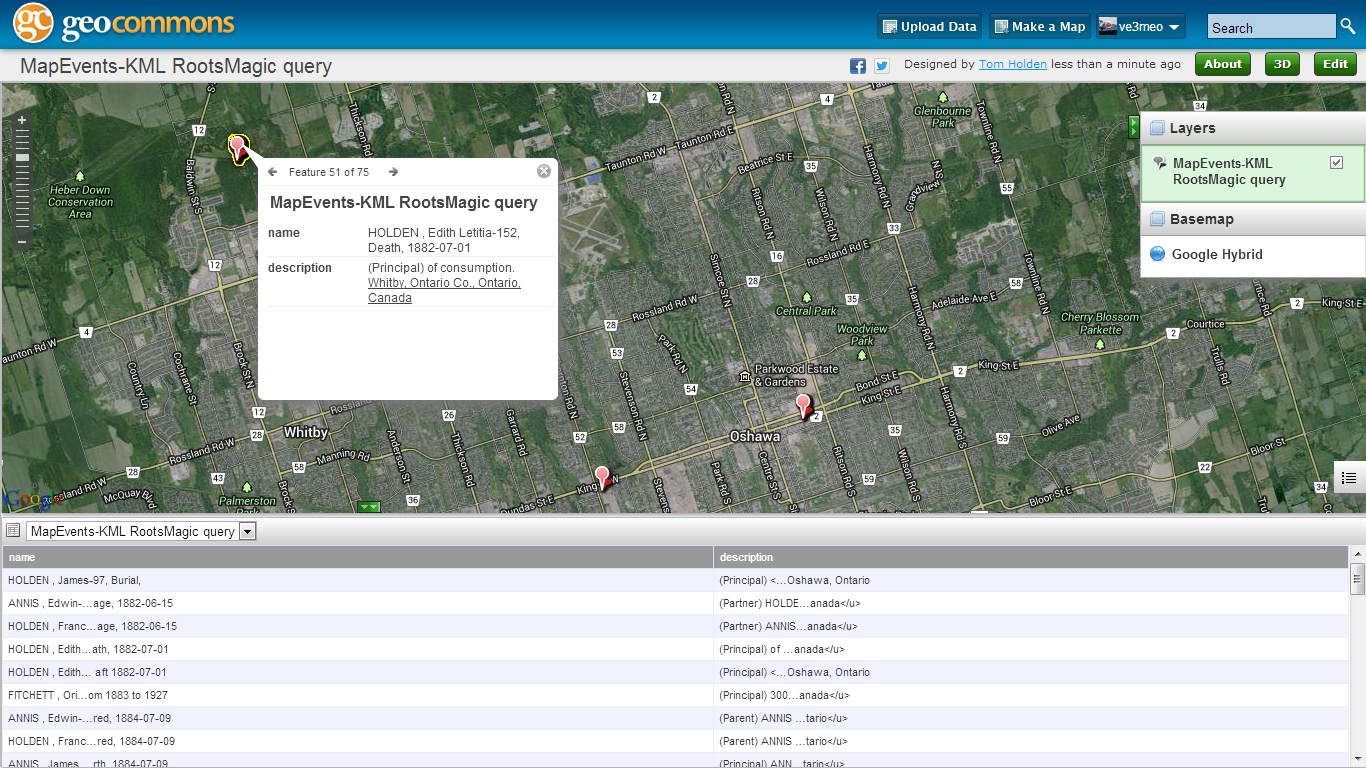
You can explore the same map online at http://geocommons.com/overlays/406864. Unfortunately, the values in the place list are truncated to a useless state and the HTML underlining for Place Details is mishandled.
OpenStreetMaps
There are a number of ways to overlay KML data onto OpenStreetMaps. One of them is uMap. Using the English version from https://umap.openstreetmap.fr/en/ (there are others), I was able to import the XML file to a layer with this result:

Because the labels for events at the same place stack on top of each other, I would restrict my query to one fact type. Further exploration and some other overlay service may offer better display for co-sited events.
How to Query RootsMagic #sqlitespy #integrity #database
Promo
Using many of these SQL queries or procedures is pretty easy with a SQLite manager such as SQLiteSpy as illustrated in the example below. Even easier, because you don’t even see the SQL scripts that underlay them, is to use the utilities bundled in the dead simple RMtrix application. The stories following relate the experiences of novice users who accomplished the same task, converting shared facts to individual ones for GEDCOM export to software that does not support RM’s shared events. One used SQLiteSpy; the other did it with RMtrix.
SQLiteSpy User Experience
Responding to a message bemoaning the problem with shared facts, Kim Mills posted this on RootsMagic-Users-L:
Bonnie, I use the shared facts to and this used to be a real frustration
point for me to. But there are a few solutions.

If you just want the _SHAR part removed so it doesn't repeat in the
RootsWeb tree. Go to your tree settings, then to living persons, under
there is a section to exclude tags. Paste _SHAR there. Now it will
look like a normal census or event for JUST the primary person.

But if you want the census or other events to be converted to a real
individual fact for each person, Tom on this group came up with a great
little program for that.
Here is a link to the page that shows how it works.
Facts+-+Split+Shared+to+Individual

I think he has also made it part of the RMtrix program that makes it
easier to run.
Bundled+Utilities+-+RMtrix

Basically make a COPY of your database, then run the utility to split
the facts, then the second one to remove the shared facts. This way the
primary person doesn't have 2 copies of the original fact. Then export
the gedcom as you normally would.

Kim

On 02/26/2013 06:54 PM, Bonnie Weisel wrote:
> I thought it would be a convenience and time saver to start using
> "Shared Facts". Unfortunately it doesn't work out when exporting and
> uploading a gedcom to wc.rootsweb.ancestry.com.
>
>
RMtrix User Experience
In the same thread, Bonnie responded that she had become a new RMtrix user!
I'd like to thank Denise and Kim for their replies on 2/26 to my
questions about exporting a database with shared facts. When exporting
a Rootsmagic database, if you want the sharee to have a copy of the
facts, you will need to use two sqlite procedures.

Last night I installed and ran Rmtrix, exported my database, all in less
than 5 minutes. My suggestion is this is the easiest route to
accomplish the task. I've copied my how-to notes below.

Installing Rmtrix:
1) The source for Rmtrix is
http://sqlitetoolsforrootsmagic.wikispaces.co/Bundled+Utilities+-+RMtrix
2) Download Rmtrix and run setup.


To upload a tree with shared facts:
1) Make a COPY of the Rootsmagic database
2) Run Rmtrix and open the COPY of the database
Events->Convert Shared to Individual
a) ->SPLIT Shared to Individual
b) ->Unshare
3) Export to a gedcom (this file can be uploaded to
wc.rootsweb.ancestry.com)
4) Delete the COPY of the database


-Bonnie
Example – SQLiteSpy Quick Integrity Check
SQLiteSpy is one of my favourites – for its clean interface, speed and display of results. Its installation is really simple – download a ZIP file from here and extract SQLiteSpy.exe to wherever you want. There is no Windows install to perform, the one exe file is complete and ready to run. You will want to create a shortcut and place it in your Start Menu and/or Desktop so you can readily launch it later. Once past the basic familiarisation, you will want to liberate SQLiteSpy from the shackles of RootsMagic proprietary RMNOCASE collation sequence by following the instructions on RMNOCASE – faking it in SQLiteSpy.
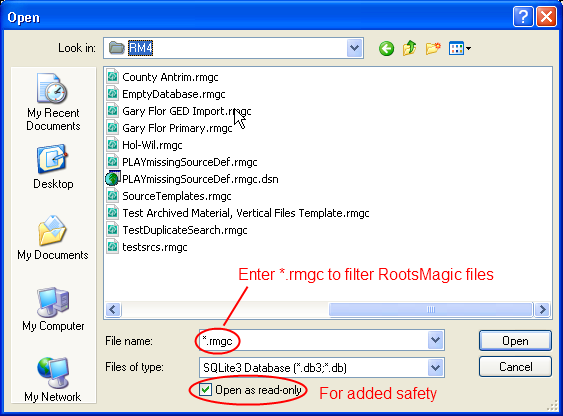
SQLiteSpy follows the conventions for Windows programs pretty well. To open a RootsMagic database, use File > Open Database to open the conventional Open dialog window. By default, you will only see files with the extension ‘.db’; to see RootsMagic files, either select ‘Any file (*.*)’ from the Files of type selection box OR in the File name entry box, type ‘*.rmgc’ (without the quotes). You may also want to be extra safe by checking the box Open as read-only.
Once SQLiteSpy has opened a RootsMagic database, you will see a screen as below, but with the right side empty.
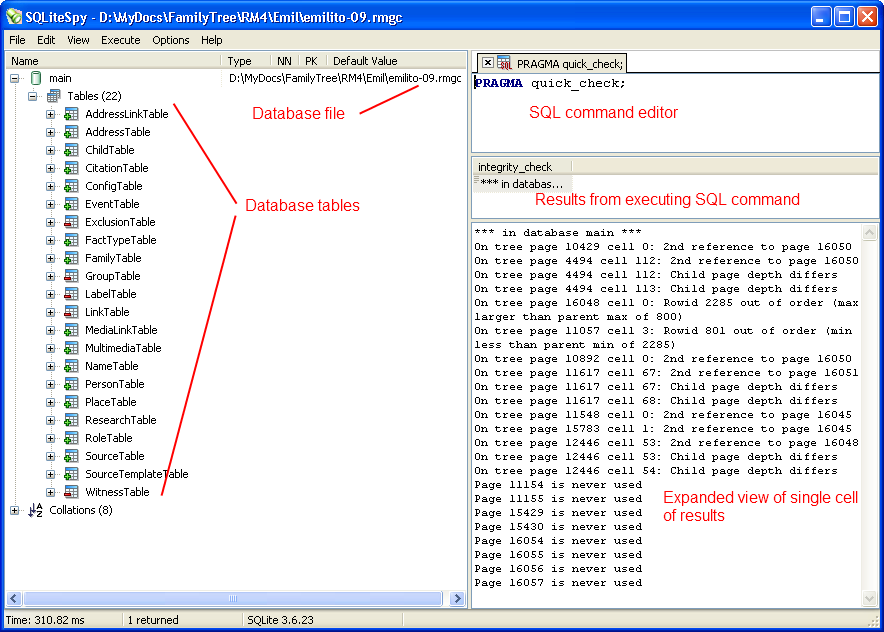
Type a SQL command or set of commands in the SQL Editor area (each command must end with the semi-colon). In the example is the command to do an integrity check without checking the indices (SQLiteSpy cannot do the full integrity check on a RootsMagic database).
Press function key F9 or click Execute and select Execute SQL to execute the commands in the SQL Editor.
The results of the commands will be shown in the middle pane (if the integrity check had passed, it would simply display ‘ok’. Any cell that is selected in the results pane will be expanded in the bottom pane. You can adjust the dividers between the panes to see more or less.
Pretty easy! If you got this far using SQLiteSpy, then you are away to the races!
The File menu is where you can load one of the SQL command files you can download from this site and save a command file you have made yourself. SQLiteSpy does a nice job of tracking recently opened databases and SQL files – just use the Reopen selection.
SQLiteSpy can execute all the commands in the SQL Editor (F9) or just a command that is highlighted (Ctrl-F9). Remember, each command ends with a semi-colon and those that retrieve data begin with SELECT. You don’t modify anything with a SELECT.
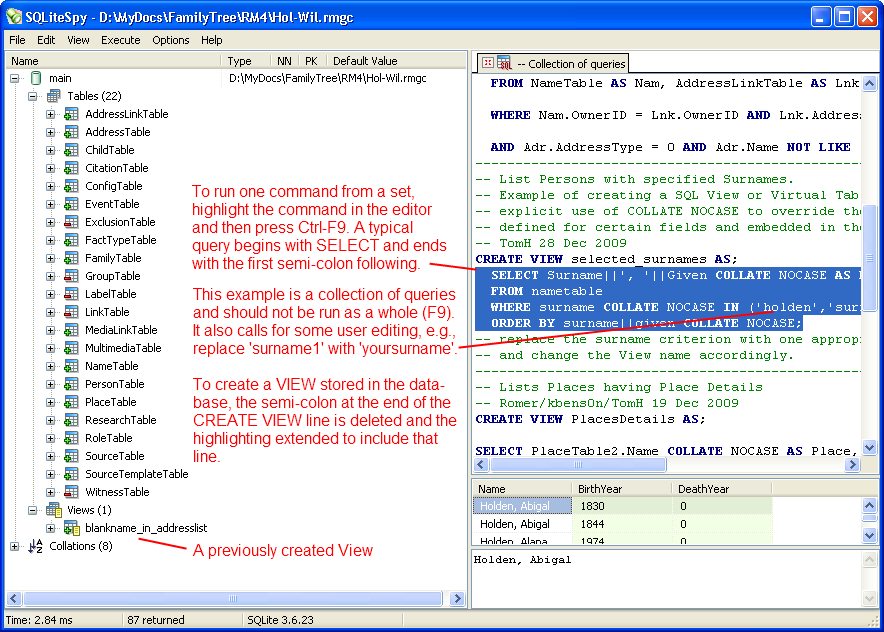
Don’t forget – RMNOCASE – faking it in SQLiteSpy for maximum access to your database.
Example – Change fact type globally
The following problem was posted in the RootsMagic Forums by user royviggo at
http://forums.rootsmagic.com/index.php?/topic/13013-change-fact-type-globally-after-import-from-legacy/#entry60476:
- Hi, I’m a new RootsMagic user, and I imported a tree from Legacy. Got my custom fact types in Legacy as new fact types in RootsMagic, and thats nice. But some of them already exists as fact types in RootsMagic, so I wonder if there is a way to change fact type globally? I can change fact type on one fact at a time, but it will be very boring to change about 500 facts for 2500 persons…
- I can edit the new fact types, but I think it’s silly to have two Residence facts, so I want to change them if possible. Any tips?
Forum user vyger responded with this well-written guide to using SQLiteSpy to accomplish the task:
- I would use the SQLliteSpy option and do regularly as I try as far as possible to keep within the Rootsmagic standard set of facts. I do this to maintain some compatibility with the recognised standard and often import gedcoms from other users with multiple custom facts. A simple explanation of how to achieve this global change appears later in this post.
- Personally I would go to Tom’s page below and download SQLiteSpy, remember to follow the link to “fake collation” and follow his instructions.
- For a novice with no database knowledge this can look very complicated but a lot can be achieved with very basic single table changes which this question asks/requests, so do read on.
- I would first make a copy of your database by finding it in Windows Explorer, Copy it and Paste it which will give you an exact copy, rename this copy as something so you will easily recognize it as your test database and try SQLiteSpy on that database first. Even when sure what you are now about to do on your working database always back it up before running any queries on it.
- Once you have opened your Rootsmagic database with SQLiteSpy remembering to change the “SQLite3 Database” file option to “Any File” you will see all the tables in the database to the left.
- Double Click on FactTypeTable and you will see a list of all Fact Types (one per row) and each identified by a unique number FactTypeID. As TomH said anything greater than 999 is a user defined fact.
- Now Double Click on EventTable, Don’t look at it in too much detail but the EventType number corresponds to the FactTypeID in the FactTypeTable, in other words they are linked and this EventTable contains all your facts both Individual and Family.
- Jump back to the FactTypeTable and examine your facts. For the purpose of explanation I will use an example where a FactTypeID #1016 is found called BORN, well we know that this is should probably be the Rootsmagic built in Birth Fact which is FactTypeID #1. So once we are happy that we want to globally make that change go back to the EventTable by double clicking on it and all we want to do is change all instances of EventType #1016 to EventType#1, really just a find and replace operation. Copy the simple code below into the pane at the top of SQLiteSpy and press F9. The bottom left info bar below the list of tables will now report the time it took to complete the operation and how many records were updated.
UPDATE EventTable
SET EventType = 1
WHERE EventType = 1016
;
- At this point open the database again with Rootsmagic, use File > Database Tools > Rebuild Indexes and check the changes you just made.
- TomH would be very expert in these queries but everything in baby steps and I can understand how some of his more complex queries can appear a bit foreboding so a primary school beginners guide would certainly get more people into using SQL IMO.

😉

- Edit : Hopefully nobody pasted the code snippet literally without changing the the SET EventType – Where EventType numbers to their own requirements. I was going to say hopefully it goes without saying but it’s better to be said just in case
:rolleyes: and remember to experiment first and always back up before applying any queries.

Discussions & comments from Wikispaces site
Facts – Add custom MRIN event to each family #facttypes #events #mrin
Why? How?
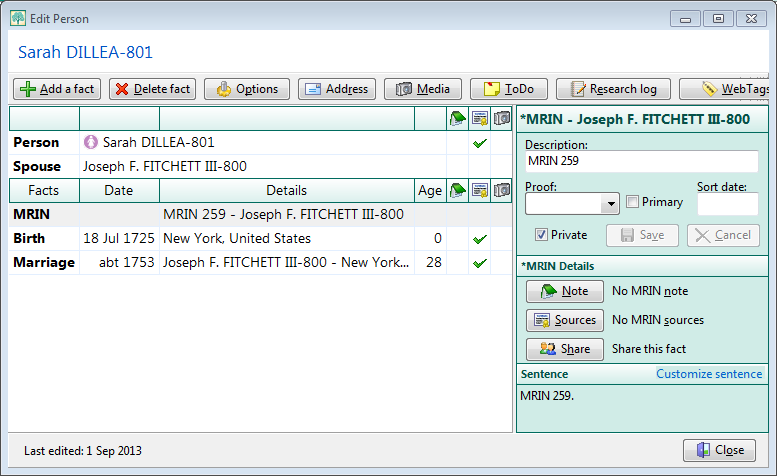 |
| Example of an MRIN event added by the script. (click for full size) |
Main Script | Mismatched FMNO Report | Earlier GEDCOM Solution
RootsMagic 6 hides the record number commonly known as MRIN except as an option in the title of the Family Group Sheet and in the Marriage List report. This is not good enough for some users who, perhaps migrating from experience with other family tree software, have a document filing system organised on MRIN. In RM, the “MRIN” comes from the FamilyID in the FamilyTable and is not based on a Marriage event; hereafter, I refer to it as FMNO. It is not preserved in data transfers via GEDCOM or drag’n’drop between RM databases, except in special circumstances. With that caveat, the following SQLite script creates a custom FMNO family event and adds it to every couple and single parent with their FamilyID number stored in the event description with the prefix “FMNO “. A second script reports on mismatches between the FamilyID number and the FMNO event value as could arise from a transfer to another database. And to round things out showing that there is always more than one way to accomplish something, see a non-SQLite method for batch creation of the FMNO events at the bottom of the page.
Main Script
-- Events-FMNO.sql
-- 2013-10-15 Tom Holden ve3meo
-- 2013-10-16 changed from MRIN to FMNO
/*
Exposes otherwise invisible FamilyID (except optionally in title of FGS)
by adding an event to each spouse containing the FamilyID.
The event added is a custom Family event named *FMNO, abbreviated FMNO which is
first created by the script if one having the same abbreviation does not exist.
*/
-- Add a FMNO fact type if none exists
INSERT
    OR IGNORE
INTO FactTypeTable(OwnerType, NAME, Abbrev, GedcomTag, UseValue, UseDate, UsePlace, Sentence, Flags)
SELECT 1
    ,'*FMNO'
    ,'FMNO'
    ,'EVEN'
    ,1
    ,0
    ,0
    ,CAST('[Desc].' AS BLOB)
    ,- 1
WHERE (
        SELECT FactTypeID
        FROM FactTypeTable
        WHERE ABBREV LIKE 'FMNO'
            AND OwnerType = 1
        ) ISNULL;

-- Delete all FMNO events  N.B. RM will delete all events for a FactType that you delete through it.
-- DELETE FROM EventTable WHERE EventType IN (SELECT FactTypeID FROM FactTypeTable WHERE ABBREV LIKE 'FMNO' AND OwnerType=1);
-- Add FMNO event to each couple without such an event, description to contain FamilyID (invisible FMNO)
INSERT
    OR

ROLLBACK
INTO EventTable(EventType, OwnerType, OwnerID, FamilyID, PlaceID, SiteID, DATE, SortDate, IsPrimary, IsPrivate, Proof, STATUS, EditDate, Sentence, Details, Note)

SELECT (
        SELECT FactTypeID
        FROM FactTypeTable
        WHERE ABBREV LIKE 'FMNO'
            AND OwnerType = 1
        ) AS EventType
    ,1 AS OwnerType -- a Family event is type 1
    ,FamilyID AS OwnerID
    ,0 AS FamilyID
    ,0 AS PlaceID
    ,0 AS SiteID
    ,'.' AS DATE
    ,1 AS SortDate -- places event at or near top of list in Edit Person screen
    ,0 AS IsPrimary
    ,1 AS IsPrivate -- presumably having this event set as private will provide needed output control
    ,0 AS Proof
    ,0 AS STATUS
    ,(
        SELECT JULIANDAY('now', 'localtime') - 2415018.5
        ) AS EditDate -- does not affect Date last edited in People view
    ,NULL AS Sentence
    ,'FMNO ' || FamilyID AS Details -- having the prefix "FMNO" helps to stand out in tabular reports
    ,NULL AS Note
FROM FamilyTable
WHERE FamilyID -- don't add an FMNO event to those couples already having one
    NOT IN (
        SELECT DISTINCT OwnerID -- list of all FamilyID's already having the FMNO event
        FROM EventTable
        WHERE OwnerType = 1
            AND EventType IN -- in case there is more than one FMNO family fact type
            (
                SELECT FactTypeID
                FROM FactTypeTable
                WHERE ABBREV LIKE 'FMNO'
                    AND OwnerType = 1
                )
        );
Mismatched FMNO Report
 |
| Example of mismatches after a drag’n’drop transfer to a new database, as displayed in SQLite Expert. (click for full size) |
Unfortunately, a drag’n’drop of Everyone from one database to a new, empty database does not necessarily preserve all FamilyID and PersonID numbers. Many were preserved but many not, as seen in this extract from the following script’s output; fully 1/3 of almost 400 FamilyIDs were changed while PersonID changes were many more. What happens is that new PersonTable and FamilyTable tables are generated and records unused in the originating database are reused in the new, thus shifting the record numbers down. GEDCOM import into an empty database offers the option to Preserve record numbers but this only applies to the person, not the family. A document filing system based on either or both the MRIN/FMNO and RIN of the originating database will be out of sync with the internal record numbers for many couples and, probably, persons in the target database. Carrying over the FMNO and RIN as events to the target database preserves the document trail for as long as those events are preserved and helps to realign the filing system with the database. Also see Copy RIN to REFN.
-- Events-MismatchedFMNO.sql
-- 2013-10-15 Tom Holden ve3meo
-- 2013-10-16 changed from MRIN to FMNO
/*
Compares the OwnerID for Family events having the Abbrev "FMNO" against
the value stored in the event description, listing those that do not match
along with the names and RINs of the couple.
Used in conjunction with Events-FMNO.sql.
*/
SELECT SUBSTR(CAST(E.[Details] AS TEXT), 6) AS FMNO -- extracts everything after "FMNO "
    ,E.[OwnerID] AS FamilyID
    ,ifnull(N1.Given || ' ' || UPPER(N1.[Surname]) || '-' || FM.FatherID, '')
   || ' + ' ||
   ifnull(N2.Given || ' ' || UPPER(N2.[Surname]) || '-' || FM.MotherID, '') AS Couple
FROM EventTable E
INNER JOIN FactTypeTable FT ON E.EventType = FT.FactTypeID
INNER JOIN FamilyTable FM ON E.OwnerID = FM.FamilyID
LEFT JOIN NameTable N1 ON FM.FatherID = N1.OwnerID
    AND + N1.IsPrimary
LEFT JOIN NameTable N2 ON FM.MotherID = N2.OwnerID
    AND + N2.IsPrimary
WHERE E.OwnerID NOT LIKE SUBSTR(Details, 6)
    AND E.OwnerType = 1 -- Family event
    AND FT.[Abbrev] LIKE 'FMNO';
Earlier GEDCOM Solution
I discovered Alfred’s 9 April 2009 solution using Microsoft Word wildcard search and replace on the GEDCOM and Romer’s 8 July 2009 reiteration of that after having developed the SQLite scripts.
Source Templates – Set Quotation Punctuation to ‘UK’ or ‘Logical’ Placement #sourcetemplates #update
Most of the built-in source templates have the comma or period separating a quotation from the rest of a Footnote, Short Footnote or Bibliography sentence (or ending the sentence with a quotation) inside the quotation marks. This is known as ‘US’ style or convention. ‘UK’ or ‘logical’ convention places them outside the quotation. This query attempts to find all such instances and move them to the ‘UK’ position.
These names for the two styles do not indicate exclusive use in either country. There are divergences in practice not only trans-Atlantic but also north-south, between sectors, fiction and non-fiction et al according to Grammar-Monster.com. It characterises the innie-outie placement of periods and commas relative to the quotation as US vs UK convention, granting that that is just a convenient oversimplification. An article by Grammar Girl echoes that and cites references that indicate the ‘US’ practice follows that of early typesetters and compositors using now-obsolete technology while the ‘UK’ practice is “logical”. Note that I placed the period ending the previous sentence outside the quotes; I cannot see any reason that it should be within.
I learned my grammar in the 50’s and 60’s in Canada which some have said is culturally mid-Atlantic, also an over-simplification, but, always trying to be logical, I evidently use “UK rules”. Apparently, Canadian practice has evolved: the government’s own guide to “The Canadian Style” encourages placing period and comma within the quotes except “when a very high degree of accuracy is required” in which case ‘logical’ placement is used. I would argue that Evidence style citations are supposed to be accurate and, therefore, …
SourceTemplates-SetUKquotePunctuation.sql
This query requires the REGEXP function which is supported in SQLiteSpy but not by SQLite Expert Personal without loading an extension.
ve3meo
07 May 2017 20:43:02
Select any cell. Ctrl-C copies the entire row in which the cell is located
Select any cell. Ctrl-A, Ctrl-C copies all rows
You are probably misled by the highlighting – I was,too, initially.
Tom