I only recently recognised that the values that RootsMagic puts into the Relate1 and Relate2 fields of the PersonTable when the Set Relationships function is applied are more useful than merely codifying the relationship (e.g., see Relationships). Apart from special cases for Self and in-laws, the sum of the two values corresponds to the degree of consanguinity (see this Wikipedia article). For example, the degree of separation in consanguinity is the same from you to your g-g-grandparents (4) as it is to your 1st cousins and your great-aunts and -uncles and your grand-nephews and -nieces. It strikes me that the consanguinity degree might be an interesting, if not useful, basis for color coding. Indeed, it is so easily implemented, I wonder why it is not an option for the Color Code People tool or that consanguinity is not a criterion for finding people and creating groups.
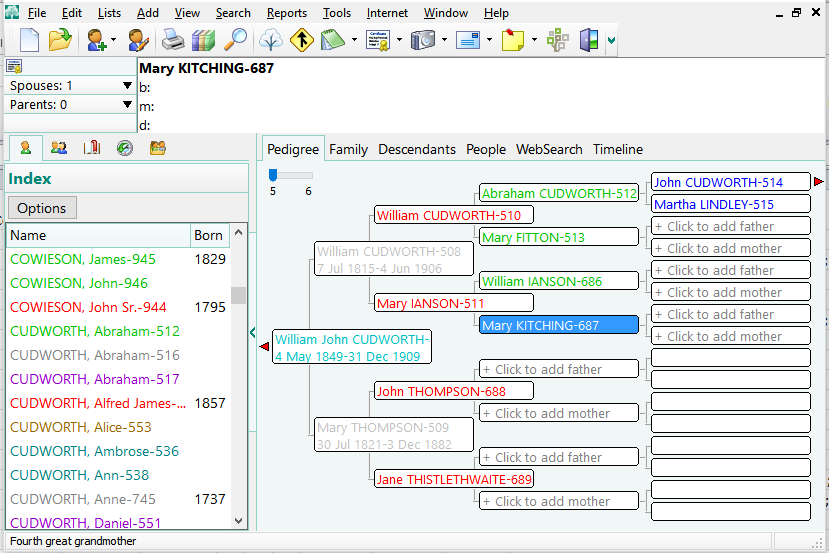 |
| Example of color coding by consanguinity degree. Note that each generation of grandparents gets a different color, a difficult task in RootsMagic. |
There are 14 color codes plus black in RootsMagic 7 thus supporting consanguinity degrees out to your 12th great grandparents and other relatives of equal degree. They are set in the Color field of PersonTable and range from 0 (black) to 14 (gray). It is a trivial script to assign the consanguinity degree directly to these color codes:
UPDATE PersonTable SET Color = MIN(Relate1 + Relate2, 14);
The MIN() function forces the highest available color code for all degrees beyond 14, which includes Self and In-Laws. These could be excluded by adding a constraint:
UPDATE PersonTable SET Color = MIN(Relate1 + Relate2, 14)
WHERE Relate1 < 999;
I have uploaded three scripts that assign the colors differently:
ColorCode-byConsanguinity1.sql Consanguinity degree mapped directly to RootsMagic color code values.
ColorCode-byConsanguinity2.sql Consanguinity degree mapped via lookup table to RootsMagic color code values so that the closest are brightest and farthest are darkest.
ColorCode-byConsanguinity3.sql Consanguinity degree mapped via lookup table to RootsMagic color code values so that the closest are darkest and farthest are brightest.
 |
| Consanguinity color coding by script#. |
I used a spreadsheet to sort the colors by brightness and hue and to generate the SQL INSERT statements that create the table to map the consanguinity degrees to color codes for versions 2 and 3.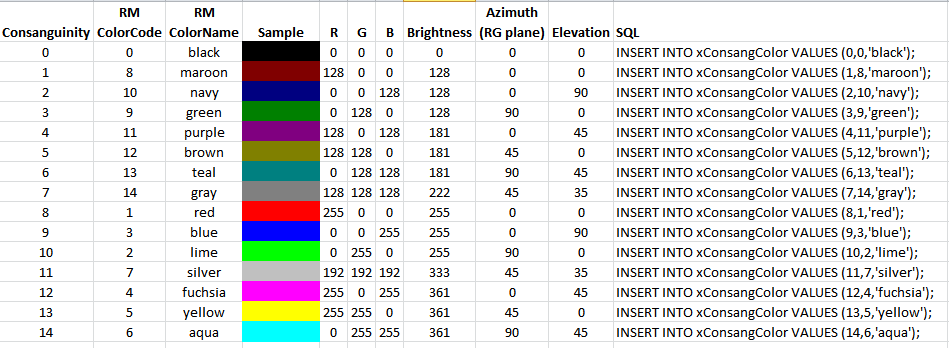
ColorCodeDistances.xlsx You could adapt this spreadsheet to color code consanguinity as you see fit and edit a script accordingly with the revised set of SQL statements.
Descendants Only 2026-02-23
If Relate2=0 and 0 < Relate1 < 999 for a person, then that is a descendant of the reference person. So, in any of the 3 scripts above, simply add a further constraint:
…
WHERE Relate1 < 999 –except self and in-laws
AND Relate2=0 –descendants only
;
The 1st script, ColorCode-byConsanguinity1.sql, works with the expanded set of colours in RM9-11 if the following line is revised:
…
SET Color = MIN(Relate1 + Relate2, 14) –change 14 to 27 for RM9-11
The other scripts need to be extensively revised along with the spreadsheet, ColorCodeDistances.xlsx, to incorporate the expanded set of colour codes and changes in some of the colours for codes <=14, the maximum number in the RM4-7 set.
I really like what this does — it make not work for everyone’s need all the time. In general it is better than by line coloring as you can only have one color. What I like is that when I look at different families views in RM — I can see 3 different colors on a family. If I see a child with a different color — I know they are most likely related to me differently (such as grand parent vs grand uncle). Seeing this in practice makes more sense. One can adapt the code for particular need. For example I modified RED to ORANGE because I want RED for people that need critical attention for facts etc.
This trick from Tom Holden gets even more interesting with RM8 / RM9 new color features:
With the 10 color code sets available now, one can have not only a consanguinity degree color set permanently available as mentioned above, but also another color set which shows permanently for all relatives in the tree to which generation of ancestor the person is related by using
UPDATE PersonTable SET Color = MIN(Relate2, 27);
I posted below about the need to color code by level of descendancy and think your
UPDATE Person/Table SET Color = MIN(Relate2,270:
is just what I need, but can you tell me where it goes in the script, or if it replaces another line?
I really don’t know how to write these scripts, but have gotten a bit better about “reading” them, but this one is totally lost on me.
Thanks in advance for your help …. or anyone else who can give me help 🙂
I’ve just implemented this sort of colour coding manually for relationships and see it like the layers of an onion out from you (or your root person).
Now I need to work out implementing it in code and this will help
This is fantastic. I was just about to ask if someone could write a script which does this.
I spoke too soon. What I need is a script to indicate DEGREE OF DESCENDANCY FROM THE ROOT PERSON. In other words, the children of my root person would be red, the grandchildren would be lime, the great-grandchildren would be blue, etc. I would rather not color code the spouses, but maybe doing so would meet the needs of more users. Maybe having the option to color code or not color code the spouses be implemented …. but if it is too complicated, don’t worry about it. Either way, is such a script possible?
If Relate2=0 and 0 < Relate1 < 999 for a person, then that is a descendant of the reference person. So, in any of the 3 scripts above, simply add a further constraint: ... WHERE Relate1 < 999 --except self and in-laws AND Relate2=0 --descendants only ; The 1st script, ColorCode-byConsanguinity1.sql, works with the expanded set of colours in RM9-11 if the following line is revised: ... SET Color = MIN(Relate1 + Relate2, 14) --change 14 to 27 for RM9-11 The other scripts need to be extensively revised along with the spreadsheet, ColorCodeDistances.xlsx, to incorporate the expanded set of colour codes and changes in some of the colours for codes <=14, the maximum number in the RM4-7 set.