Source List Query #sources #sourcetemplates #citations #xml #date

RM8 version is compatible with #RM10

Description

Here are the most advanced and useful SQLite queries for reviewing citations in your RootsMagic 4-8 database. They provide some of the same info that you would get in the RootsMagic Source List report and then some you don’t… You have the advantage of sorting and filtering results in ways you cannot within RM and then finding the person and fact using that source in RM. And they provide the key ID’s with which you can find specific table records and possibly edit fields directly using SQLite (if you know what you are doing). What is yet missing is expansion of the data into sentences using the sentence templates; this requires a high level programming language and is unlikely to be added.

Two Queries

Two separate queries are needed because basic SQLite managers can only present results in tabular format and screen width is insufficient to show all the fields that make up a fully detailed RM4 Source List report. The two queries provide, respectively,:

  1. List of all the citations (relatively many) with details against the names of the Master Sources (RM4-8 as of 2022-02-21)
  2. List of all the Master Sources (relatively few) with their details but not the Source Details of each citation (RM4-8 as of 2021-03-03)

Using a SQLite manager that supports two or more queries in separate windows or tabs (e.g. SQLiteSpy), it is easy to have both queries’ results available by toggling between windows. To view the properties of media items, use the Media List Query in a third window.

1. Source List – Citations

Download SourceList.sql RMtrix_tiny_check.png for RM4 to #RM7
2011-11-06 now reports Free Form and orphaned citations; count of media items linked to citation; improved format of CitFields; compatability with managers other than SQLiteSpy.
2011-11-18 now outputs Source Fields as per MasterSources.sql plus Event Place and Event Site (Place Detail)

Download SourceList-RM8.sql #rm8 version of SourceList.sql 2022-02-21

This complex query was built on Romer’s much earlier Source Template List – Query. In so doing, I discovered errors and inconsistencies in and among it and my All Citations – Query and All Citations & Dupes Count – Query. Hopefully, these are now resolved with revisions to all of them. Major additions include date decoding from Date Decoder and the stripping of XML tags from the FIELDS field pioneered in Source Detail View (Parsing XML). The result is a very comprehensive and readable spreadsheet. Here are two examples of output displays from two different SQLite managers, a different set of columns selected for display:

SourceListQueryScreenShotExpert.png
From the latest version of the query, as displayed by SQLite Expert. Note the wrapping of text.

SQLite Expert requires that you comment out the ORDER BY clause in order to sort on a results column; it adds an ORDER BY clause and re-runs the query. It has excellent filtering tools but one can add one’s own WHERE clause to filter results.
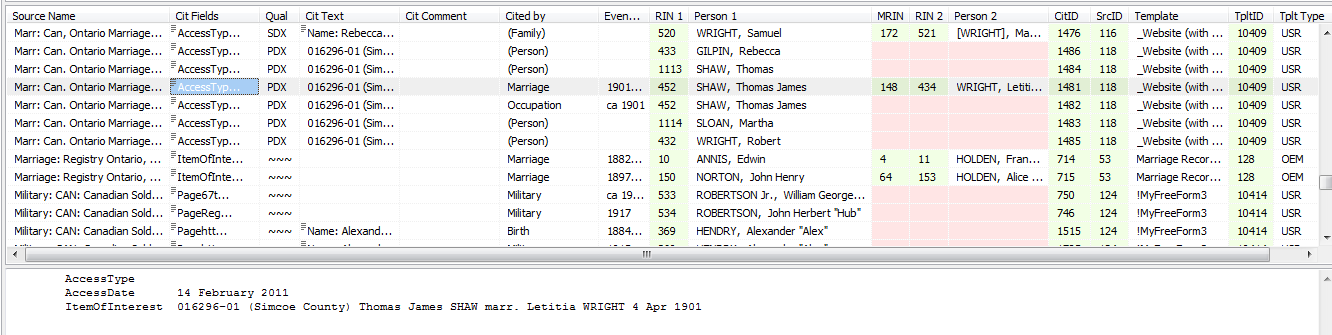
SourceListQueryScreenShot.png
Screenshot of results of the query from SQLiteSpy

At the bottom of the screen, you see the content of the highlighted cell. Clicking on any column heading will sort on that one column. The order displayed in this screenshot is defined in the query which can be readily changed to suit your particular requirements. This one is sorted on Source Name, Cit Text, Cit Comment, Person 1, Cited by, EventDate, Person 2 and would be useful for reviewing citations of a source having identical texts.

Column Definitions

Column Description Editable
Source Name name of the Master Source; primary sort field in this query N
Source Fields the field names and values entered in the Master Source Y
Cit Fields the field names and values entered in the Source Details screen for a citation Y
Qual citation quality code (decoding would take up too much screen space but you’ll get the drift) Y
Cit Text Source Details text Y
Cit Comment Source Details comment Y
Cited by person, family or fact type that cited the source N
EventDate fact/event date (helps to pick out in the Edit Person screen which of two or more facts of the same type cited the source) N
Event Place Place of the fact/event N
Event Site Place Detail of the fact/event N
RIN 1 record number of person whose fact cited the source N
Person 1 name of person whose fact cited the source N
MRIN FamilyID of FamilyTable, the Marriage Record Number that is invisible in RM4 N
RIN 2 record number of spouse N
Person 2 name of spouse N
CitID CitationID of CitationTable N
SrcID SourceID of SourceTable N
Template name of Source Template N
TpltID TemplateID of SourceTemplateTable N
Tplt Type “OEM”=Built-in Source Template (TemplateID<10000); “USR”=user-defined Source Template (TemplateID>9999) N

2. Master Sources

Download MasterSources.sql RMtrix_tiny_check.png #rm7
2011-11-06 now reports Free Form and orphaned citations; count of media items linked to master source; improved format of SrcFields

2017-03-21 show unused Master Sources and correct citation count (was offset by 1)

2020-06-21 the offset ‘corrected’ above was for unused Master Sources and threw all others off by 1; this rev works for both used and unused Master Sources.

Download MasterSources-RM8.sql #rm8
2021-03-03 Converted to work with both RM7 and RM8 format – PJ Feb2021
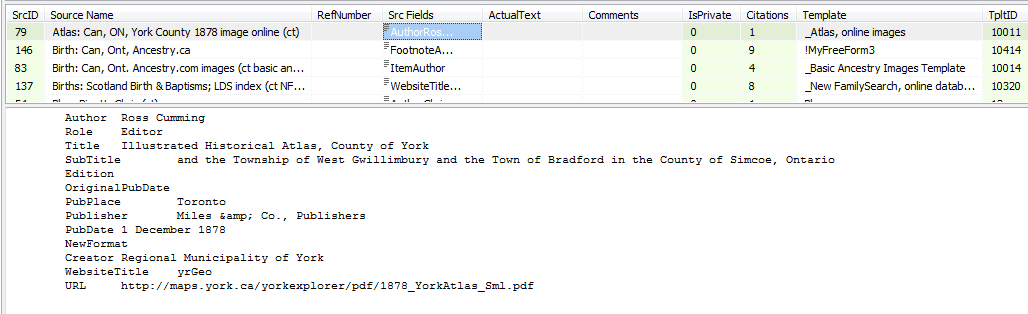
MasterSourcesScreenShot.png

Column Definitions

Column Description Editable
SrcID SourceID of SourceTable N
Source Name name of the Master Source; primary sort field in this query N
RefNumber Master Source File # Y
SrcFields the field names and values entered in the Master Source screen Y
ActualText Master Source text Y
Comments Master Source comments Y
IsPrivate 1 if Master Source marked private, else 0 but currently unused (?) Y
Citations number of times Master Source is cited N
Template name of Source Template N
TpltID TemplateID of SourceTemplateTable N

Discussions & comments from Wikispaces site


thejerrybryan

The Queries Don’t Run on My System

thejerrybryan
05 November 2011 23:09:17

Neither query will run. There are no error messages. It’s just that there are no results at all – almost as if my database were empty. But I can hand code very simple queries that demonstrate my chosen SQL manager SQLiteSpy is working ok and that my database is not empty.

Any ideas?

Thanks,
Jerry


thejerrybryan

thejerrybryan
06 November 2011 00:10:08

I haven’t looked at the first query yet, but the second query won’t run because all I have are Free Form templates. Hence, the following:

FROM SourceTemplateTable
INNER JOIN SourceTable ON
SourceTemplateTable.TemplateID = SourceTable.TemplateID

yields a NULL result because the Free Form template appears not to be in the SourceTemplateTable.

Jerry

Places – Delete Unused #places #placedetails #delete #phantom

RootsMagic 7 is very cautious about deleting Places and Place Details, allowing only one at a time and requiring user confirmation of the “Are you sure?” type. This script is the absolute opposite and deletes all unused Places without hesitation. Were you to transfer your database by drag’n’drop or via GEDCOM to a new database, unused Places (and other unused items) would not be included so what’s the big deal? See if you are comfortable with GEDCOM & DnD transfer losses. Deletion of unused Places in RootsMagic needs empowerment.

This script deletes all those Places and Place Details records from the PlaceTable if unused by any Event plus all Place Details orphaned by having no master Place. It is simply a series of statements extracted from the DeletePhantoms.sql script at the page Delete Phantoms.

After executing the script, you should run RootsMagic’s File > Database Tools to correct probable indexing errors arising from the use of the fake RMNOCASE collation.

PlacesDeleteUnused.sql

SQLite Managers for Mac OS #sqlitemanagers

There is growing interest in the RootsMagic user community in being able to run SQLite Tools for RootsMagic scripts under the Apple MacIntosh operating system. If RootsMagic Inc succeeds in releasing a multi-platform version, then there will undoubtedly be a surge in the number of native-Mac OS users of RootsMagic and corresponding pursuit by some of them of a good SQLite manager. Neither of the SQLIte managers currently favoured by this wiki for the Windows OS are available for the Mac OS. Moreover, the only comprehensive list of SQLite Management Tools for various operating systems has not been updated since 2011. So this page is intended to consolidate info about potential candidates for the Mac OS to parallel that for Windows on this wiki’s page SQLite Managers.

Important Criteria

Based on the experience with SQLite script development so far for RootsMagic databases, these are factors that vary from manager to manager and would, ideally, be found in one:

  • low cost
  • extension for RMNOCASE collation
  • REGEXP() function for search and filtering
  • run-time parameters for user input (RTP)
  • FTS3, FTS4 (full text search)
  • high level scripting language (Lua, Qt, Tcl, …) for custom functions, more powerful, user-friendly utilities


Criterion SQLiteStudio 3
Cost free
RMNOCASE auto substitutes NOCASE
REGEXP() Y
RTP Promised for v3.1
FTS FTS3, FTS4
Scripting Qt, SQL, Tcl custom functions

Merge Duplicate Single Parent Couples #merge #spouse #child #phantom

The title of this page was really difficult to compose. It has to do with records in a RootsMagic database’s FamilyTable for which each record pairs the record numbers of a ‘husband’ and a ‘wife’, i.e., columns named “HusbandID” and “WifeID”. Set aside questions of gender.

When a person is linked to a single parent, a record is added to the ChildTable for that person with a pointer to a record added to the FamilyTable (FamilyID) in which one of HusbandID or WifeID is 0. It is possible for multiple children to be linked to more than one record (family) in the FamilyTable that have the same pairing of a person in the database (has a RIN) with a spouse having no RIN. In that case, the ID’d spouse will be seen to have multiple spouses and the children will be spread across multiple families.

From a user’s perspective, since nothing is known about the unidentified parent, it is desirable to combine all the children under the single known parent and to merge the duplicate unknown spouses. Consequently, the objective might be described in a few ways, different from the page title, e.g.:

  • Merge Unknown Spouses
  • Merge Single-Parent Families
  • Merge Duplicate Couples
  • …

The stimulus for this script came from the following message posted to Submit Your Problem page:

Merge unknown spouses
I have a good number of people where one of the spouses is unknown (usually the wife). When I imported to RM (from The Master Genealogist) a separate unknown spouse was assigned to each of the children. For instance, in TMG I had John Smith with 1 unknown wife and 5 children. In RM I have John Smith with 5 unknown wives, each with 1 child. I need a SQLite that will merge the children under the known spouse and combine all the unknown spouses.

The script is fairly crude and may have unexpected side effects so try it on a copy of your database and review extensively before adopting it as your new master database. One very likely effect will be incidents of the empty Family View symptom which can be fixed using the script at SpouseID Invalid.

ParentSingleMerge.sql rev 2017-02-14 corrected bug that assigned all children to 1 parent

Names – married name in death sentences #names #alternatenames #death

RootsMagic 7 offers no means of using an Alternate Name value in its sentence template language for events for any fact type other than Alternate Name. Some users want to use a wife’s married name (husband’s surname) for her events after Marriage, especially the end-of-life events as the married name is commonly recorded or engraved on headstones. Within RootsMagic, the only workarounds are to:

  1. customize each event sentence to incorporate the husband’s surname literally, not as a field,
    or
  2. share the event with the husband which then enables retrieval of the husband’s name in a custom default sentence.

Either way is labour intensive.

This script carries out the first workaround in a matter of seconds, applying a custom local sentence to each of the end-of-life events for a wife having a valid Marriage event. It does not touch the events of a person with no Marriage event nor one with a subsequent Annulment or Divorce event. A polygamist woman would take the name of the last groom. It ignores Alternate Names but perhaps that is a possible enhancement that would be desirable to accommodate name hybrids such as maidenname-husbandname.

Name-Married_in_DeathSentence.sql

SpouseID Invalid #spouse #error #family

Update 2021-03-11: scripts work on #RM8.

This page stems from weird behaviour that surfaced in a database that suffered from the initial direct TMG import by RM 6.2.3 which created a single parent family for each child (see discussion – link broken in migration from Wikispaces). After running the script Merge Duplicate Single Parent Couples, inspection of the results encountered an empty Family View when going to certain persons selected in RM Explorer or navigating to them through Family View. What was then discovered was that the SpouseID in the PersonTable was invalid – there was no such couple in the FamilyTable. Setting the SpouseID to 0 cleared the empty Family View symptom.

The PersonTable.SpouseID value directs which spouse would be displayed in the Main View when one, other than some default, was selected. Its name is somewhat misleading because it contains the FamilyID in which the selected spouse is tied to the focus person, not the RIN of the spouse. In the case reported above, there were multiple FamilyIDs for a person each with a spouse of RIN 0 and all but one were deleted by the Merge process. The SpouseID could then be left pointing to a now-non-existent FamilyID, resulting in a blank or empty Family View.

Check for Invalid SpouseIDs

This script is useful for examining the behaviour of SpouseIDs as spouse selection or navigation is executed in RootsMagic.
SpouseID_Invalid-Check.sql

Reset Invalid SpouseIDs

This script resets the invalid SpouseIDs reported by the above script to 0.
SpouseID_Invalid-Reset.sql

Births – Add from Christening or Baptism #birth #events

2026-08-05 Updated for RM11

This Gemini generated script updates from the RM7 version below with the added features that the RM People View gets the column Date Last Edited updated for the affected persons and the BirthYear in various displays is set. Also, instead of the ‘Before’ prefix being added to the Date and SortDate, the ‘By’ prefix as was suggested in a Comment is applied.

Birth-AddFromChristenBaptism_RM11_ByDate

The procedure with Gemini started with a rather simple prompt that included the original script, requesting it to check for compatibility with RootsMagic 11, update it accordingly, and to propose any improvement in the code. The first response was excellent, collapsing the script from multiple statements into a single, efficient query. However, Gemini hallucinated that the FactTypeID for Baptism (7) had been swapped with that for Burial (4) after RM7. Subsequently, as I added the updating for Date Last Edited and BirthYear displays in RM11, Gemini added additional statements, a temporary table and enclosed the set in a transaction.


RootsMagic 7, as does some other software, uses the date of the Christen event as a substitute birth date for age calculations and summary displays when there is no Birth event. But RootsMagic’s own mobile application for iOS and Android does not. Moreover, some users object to using the Christen fact type, on principle or perhaps having already extensively used the Baptism fact type and not wanting to have to change those instances one at a time, just to get the benefit of the auto-substitution. If that is all that is wanted, then the script Facts – Change Fact Type should suffice. This script removes the reliance on auto-substitution by creating a Birth event from the Christen or Baptism event for all persons having one or more of those but no Birth event.

Birth-AddFromChristenBaptism.sql

-- Birth-AddFromChristenBaptism.sql
/* 2017-02-11 Tom Holden ve3meo
For persons having no Birth event but with either a Christen
or Baptism event, adds a Birth event duplicating the CHR or BAPM
event.
 
It does not copy citations or media and does not modify
the Date or SortDate. If a person has both CHR and BAPM, it
copies CHR. If a person has multiple CHR or BAPM events,
it copies only one which with priority given to IsPrimary
and secondly to lowest SortDate.
*/

…and it does not replicate sharers if the source event is shared.

Problem Adding Entries to MediaLinkTable #media #views #citations #sources

I don’t usually post a page here requesting help, but I’ll make an exception in this case. I have created a query that adds rows to the MediaLinkTable. The purpose of the added rows has to do with the fact that I’m an extreme source splitter and therefore I link media files to RM’s Master Sources and not to RM’s Source Details. I now find that because of the way I would like my data to appear in a new product called GedSite, it would be convenient for the same media files to be linked to all the Source Details associated with each Master Source.

It seems like a query that’s simple enough. After running the query, the MediaLinkTable looks perfect from SQLiteSpy. After running the query, the data look perfect from the RM user interface. After running the query, the data looks perfect in GEDCOM I export for use with GedSite. And after running the query, the data looks perfect in GedSite (well, not quite perfect – there is some duplication of some of the data, but that’s acknowledged to be a bug in GedSite and not a problem in the GEDCOM). So what’s the problem? After running the query, I’m no longer able to tag any media files in RM to any kind of object to which media files can be tagged.

When I say that after running the query that the data looks perfect in the RM user interface, I mean the following. There are several ways to look at RM’s media tags, and for example you can do it from the Media Gallery. If you highlight a particular media item, you see all the tags in a panel on the right side of the screen. Tags to Master Sources manifest in the list as tags to “sources” and tags to Source Details manifest in the list as tags to “citations”. After running the query, all the tags are there, both the tags to “sources” that were there before running the query and tags to “citations” that were added by the query.

A minor glitch that I don’t think has anything to do with anything is that the MediaLinkTable is an indexed table, and you have to run RM’s File->Database tools->Rebuild Indexes tool to rebuild the indexes after running the query, but I have done so.

The symptom when trying to add new media tags from the RM user interface is that doing so initially looks like it has worked, but then what appears to be the newly added tag hasn’t been added after all. There is no error message. This is a wild shot in the dark, but I have the sense that my query needs to do something to “close out” or “commit” what it has done, and I’m probably missing something obvious. So any advice would be most appreciated. The text of my query follows. The rather curious looking condition AND S.Name LIKE(‘*%’) is because all my extremely split sources have a name that starts with an * and all my older lumped sources have a name that doesn’t start with an *. I only want to apply this query to the extremely split sources. The condition ON ML.OwnerType = 3 serves to select only existing media links to Master Sources because those are the ones I want to replicate as links to Source Details.

Jerry

P.S. This query needs to do an update on a JOIN and SQLite does not support doing an update on a JOIN, or at least not directly. You can still do an update on a JOIN in SQLite by hiding the JOIN in a sub-query or by hiding the JOIN in a view. I have hidden the JOIN (several of them, actually) in a view.


----------------------
-- Create media links for all citations whose master sources have media links,
-- making the media links for the citations match the media links for the master sources.
DROP VIEW IF EXISTS CitationsNeedingMedia;
CREATE TEMP VIEW CitationsNeedingMedia AS
SELECT C.CitationID AS OwnerID, S.SourceID, S.Name, ML.MediaID, M.MediaFile, 4 as OwnerType,
       ML.IsPrimary, ML.Include1, ML.Include2, ML.Include3, ML.Include4,
       ML.SortOrder, ML.RectLeft, ML.RectTop, ML.RectRight, ML.RectBottom, ML.Note,
       ML.Caption, ML.RefNumber, ML.Date, ML.SortDate, ML.Description
FROM CitationTable AS C
          JOIN
     SourceTable AS S ON C.SourceID = S.SourceID AND S.Name LIKE('*%')
        JOIN
     MediaLinktable AS ML ON ML.OwnerType = 3 AND ML.OwnerID = S.SourceID
        JOIN
     MultimediaTable AS M ON ML.MediaID = M.MediaID
ORDER BY S.Name, C.CitationID;
 
INSERT OR ROLLBACK INTO MediaLinkTable (MediaID, OwnerType, OwnerID,  -- These are the "new" items. In particular
                                                                      -- OwnerType must be 4 and OwnerID must be the CitationID
                                        IsPrimary, Include1, Include2, Include3, Include4,
                                        SortOrder, RectLeft, RectTop, RectRight, RectBottom, Note,
                                        Caption, RefNumber, Date, SortDate,Description)
SELECT MediaID, OwnerType, OwnerID,
       IsPrimary, Include1,  Include2, Include3,  Include4,
       SortOrder, RectLeft,  RectTop,  RectRight, RectBottom, Note,
       Caption,   RefNumber, Date,     SortDate,  Description
FROM CitationsNeedingMedia;

Discussions & comments from Wikispaces site


ve3meo

RootsMagic needs to close and reopen the database

ve3meo
06 February 2017 22:11:05

I see the same behaviour, Jerry. Closing and reopening RootsMagic clears the blockage; I expect it is simply a matter of closing and reopening the database. RM must set some internal counter or pointer on one of the affected tables to its last rowid and when it tries to append a record at that pointer + 1, it hits a SQLite error which it does not report. Your script has already created a row at that point and it has to be unique.

Tom


thejerrybryan

thejerrybryan
07 February 2017 03:21:04

Thanks. I guess I thought I had already tried the close and open RM trick, but I’ll try it again. In the meantime, here is a question – is this an issue you have encountered before? Which is to say is the same thing likely to happen with any script that adds rows to a table? Most of my queries have been just reports not updates. And my few updates have usually updated a row in place rather than adding new rows. So this is sort of new territory for me.

Jerry

Names – Delete Duplicate Alternate Names of Type ‘Married’ #alternatenames #names #duplicates

A member of the RootsMagic-Users Facebook Group posted this question:


=====Ted Duffy=====
February 3 at 11:04am


I just imported my Legacy Family Tree database into RM7. Many of my female ancestors now have exact duplicate Alt Name Facts in RM7. Is there a way to bulk delete these duplicates?

Of course, the answer is not in the tool-set RootsMagic 7 provides. But SQLite can come to the rescue. Here’s a pretty short script that should do the job. Be warned that it looks for exactly duplicated name fields (all name fields), not just similar ones. And it only operates on ‘Married’ Alternate Names.

Be sure to test on a copy of your database or make a backup just prior to running the script.
Names-AltMarriedDupeDelete.sql

WebTags – convert to Notes et al #webtags #gedcom

Intro

WebTags, introduced in RootsMagic 6, are not successfully exported to 3rd party software. One wish is for an export option that would append WebTags to the Note or Comment for the related entity which are supported by GEDCOM 5.5. Until that happens, this special SQLite3 query offers a potential workaround and a possible model for a future RM feature.

Conditions

RM6/7 offer the WebTag feature for Persons, Sources, Citations, Places and Research Log items. The first three entities are supported in standard GEDCOM; the last two require custom GEDCOM which is largely incompatible with other software so there is no point in attempting to convert their WebTags. Person Notes, Source Comments and Citation Comments are GEDCOM compatible so that is where we will append the WebTags.

Because there can be multiple WebTags for a given entity, I could not come up with a procedure that appended all its WebTags with a single command. Instead, this script is to be executed repeatedly until the temporary tables it creates are all empty.

Screenshots

WebTagsWindow.PNG
List of WebTags for Hiram Decker-321
WebTagsToNotesWithoutPrivateParts.PNG
Individual Report showing the content from WebTags appended to the Personal Note. Private notes excluded.
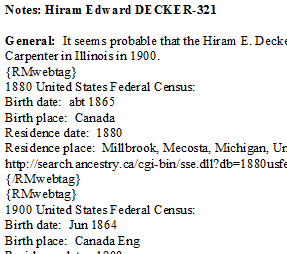
WebTagsToNotesWithPrivateParts.PNG
Extract from Individual Report with Private Notes included, thus showing the {RMwebtag}{/RMwebtag} pair demarking each WebTag.

Download

WebTags_to_Notes.sql Rev 2016-11-20