SplitTree #splittreeancestorsleaves #application #visualc

The RMSplit C# program below allows you to create a group in RootsMagic5 which contains a selected person, their ancestors, and a selected number of “leaves” (collateral lines us a given depth). If you choose one leaf, you will get children of everyone in the direct line (and their spouses if that is checked). If you choose two leaves, you will also get the children and parents of those in the first leaf, and so forth. Once the group is created in RootsMagic 5, you can then use the group to create reports for that group or export just the people in that group to a GEDCOM file. There are two files below. RMSplitBinary.zip has the files you need to install the program on your computer. Unzip the file to a directory on your computer and then run SETUP.EXE from that directory. There is internal documentation in the program. RMSplitSource.zip has the C# source code necessary to build your own version. I developed the code using Microsoft Visual C# 2010 Express and System.Data.SQLite from https://system.data.sqlite.org/.

The usual caveats apply to using this program:

  • I am the only one who has tested this so far. Please try it on a backup copy of your database to make sure it works for you.
  • You are welcome to modify and use the source code in your own projects, but please give me credit for the part I wrote.
  • This is not supported by RootsMagic and has only been tested on the current version of RootsMagic 5 as of 3 Jan 2012. (caveat emptor)

(The previous binary didn’t work for many users. Please leave a message and let me know whether this one works for you. There are two binary files to choose from. Use RmSplitbinary64.zip if you are running a ‍‍64-bit version of Windows‍‍ and RmSplitBinary32 if you are running a 32-bit version of Windows.)
RmSplitBinary32.zip
RmSplitBinary64.zip
RmSplitSource.zip

Author: R. Steven Turley

Won’t run?

Probably the same problem and solution as described for RMtrix.


Screenshots From a Modified Build

These are from ve3meo’s variant.

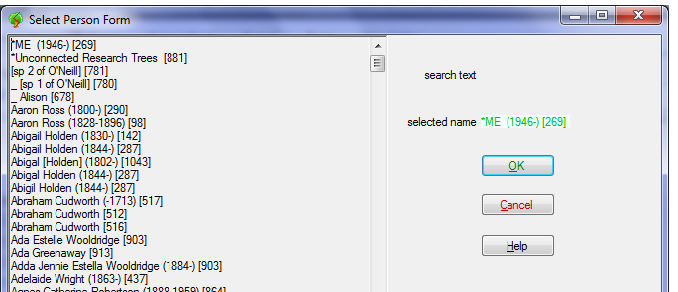
RmSplit-SelectPersonScreen.png
Select Person Form called from the Main screen Change Root Person button. The full name list includes alternate names and birth-death years. On opening it defaults to the first name.
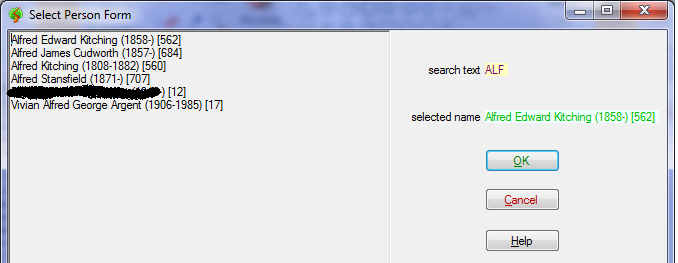
RmSplit-SelectPersonSearchScreen.png
Typing some letters filters the name list to only those containing the string. Click on any one to select it.
RmSplit-MainScreen.png
Main screen after selecting the database file, setting the root person, generations and leaves parameters, naming and creating the group. At the bottom is a status area showing the time it took (less than 1s) and the number of persons in the group. On the right is a log of actions,
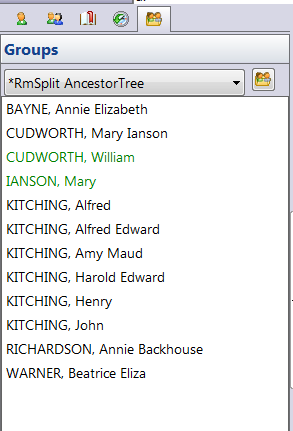
RmSplit-RM5GroupSidebarScreen.PNG
Clip from RootsMagic 5 sidebar showing the members of the group created by RmSplit. To refresh the list after running RmSplit with different parameters, click on the Add, Edit, Delete Named Group icon next to the group name list box and cancel the resulting Named Groups dialog window.

Discussions & comments from Wikispaces site


ve3meo

Congrats! but no process

ve3meo
03 January 2012 22:16:55

Steve,
Congratulations on being the first member to post a high-level language app to work on the RM database! I have been feeling the urge to do so but don’t have the skills and maybe not the tools. I’m intrigued at your choice and wondering if they are free.

On the down note, although the app seems to have installed and can be found in the Start menu, no running process persists beyond a fraction of a second. This is on a AMD dual proc notebook running Win 7 64b Home Premium.

Tom


rsturley

rsturley
03 January 2012 23:53:54

Hmm. I’ll try installing it on a similar computer and see what happens.

I purposely chose free tools for this app so they would be easily available to others. It seemed to be in the spirit of the rest of the things here. Visual Studio 2010 Express can be downloaded for free from microsoft. The sqlite library for .NET is similarly free.

I’ll keep you posted on the installation problems. One option you obviously have is to download Visual Studio 2010 Express for C# from Microsoft and rebuild my application from the source on your machine.


ve3meo

Why Visual C#? Which wrapper?

ve3meo
04 January 2012 22:13:22

Steve, would you explain why you chose Visual C# over Visual C++? And which System.Data.SQLite setup or binary package do you use? I see there are several that all come with Visual C++ runtime (2008 or 2010) and wonder if that says anything about the preferable development tool.

Tom


rsturley

rsturley
05 January 2012 14:23:23

I chose Visual C# because I find it’s a quicker development environment for projects like this. The advantage of C++ is that it has a more direct connection to the base sqlite library which is written using unmanaged code. For other projects, C++ tends to be more portable, but an application written specifically for Windows like this one is tied to a single platform anyway.

Mostly, it’s a personal preference. I am a physics professor and do a lot of research work with students. I have found that I can bring them up to speed faster on C# programming than C++ so I tend to gravitate towards that for simple windows programs.

That said, if I was writing a big production code or if performance were at a premium, I’d probably use C++.

If you look at the supplied source code, you’ll note some conditional compilation sections (which are turned off) where I did some timing tests on this program. In the initial tests I did, most of the delays in processing the file were in the native sqlite library rather than the managed C# code.


ve3meo

New Wiki for Apps?

ve3meo
04 January 2012 22:40:23

I wonder if we should start a separate Wiki for, say, “Outboard Apps for RootsMagic” or “RootsMagic Add-Ons”. This one is already daunting to navigate and its focus could be blurred by including the development of standalone apps. If such development proved to be substantial, and were to occur across more than one platform, I could imagine a further forking into the different platforms.

Any comments?

Tom


rsturley

rsturley
05 January 2012 14:33:51

I suggest first seeing how much interest these is in stand-along apps and utilities. You noted that I’m the first one to contribute something like this. If there is a lot of interest, we could fork later.

Some of the challenge of navigating the current wiki is in organization. On the home page, you have some nice divisions for general information about writing queries, but no good place to organize the many queries people have contributed for different reasons. If there were a way to put these together in come kind of linked tree or web structure, it might be easier to browse through related contributions.

A reorganization might also address another question you raised about whether a fork to an RM5 query would be a good idea. If we tagged contributions as to whether they pertained to RM4 or RM5 (or both), they might profitably existed side-by-side in the same wiki.

If you do decide to fork the wiki, please be sure to provide two-way links between them. I learned a fair amount from this wiki in figuring out how to write the stand-alone application I have contributed here.


ve3meo

Speed

ve3meo
07 January 2012 03:54:14

It took 0.0816334 seconds to create nameList with 1196 elements and primaryNameList with 1157 elements.

I then created a group with gen and leaves =100, spouses not included. First time I tried it I thought it was in an endless loop. Tried it again – took 2:26 to complete:

Creating Group Tree

Creating group in RM database.
There are 1136 entries in the tree
Removing current group
Adding new group
Finished

In effect, it got almost everyone in my tree, except maybe for the spouse of an ancestor’s descendant with no child.


ve3meo

Compiled my own version

ve3meo
07 January 2012 04:35:47

Blundered around not knowing what I’m doing given little exposure to any IDE. Puzzled over which SQLite wrapper from https://system.data.sqlite.org/index.html/doc/trunk/www/downloads.wiki and where it was to be unzipped and how to add it to Visual C#. Having installed Visual Studio 2010 C# Express successfully, I thought downloading Steve’s RmSplitSource.zip might show me. Turns out his project files include the necessary ones from system.data.sqlite, because I was able to compile a 64bit version of RmSplit.

And proved that I was not fooling myself by tinkering with the main screen layout, re-publishing and installing. Sure enough, I’m using RmSplit with my modified screen!

On to the Visual C# beginners’ course…


ve3meo

Bug with Leaves

ve3meo
07 January 2012 15:47:53

Seems that if Leaves is very large, it does not matter what Generations is set at – the entire tree is marked. Taking a root person at the bottom of the tree, 0,1,2,3,… generations, if Leaves is >=12, 1136 persons are marked. That’s using my compilation but I haven’t touched the underlying code – wouldn’t know where to begin.

Maybe I misunderstand how Leaves is intended to work?

Tom


ve3meo

ve3meo
07 January 2012 15:54:56

Moreover, once Leaves exceeds the value that marks the whole tree, larger values take longer to arrive at the same result. Seems that there is a loop which has no exit when all descendants have been identified and so keeps going until some limit set by the Leaves value.


ve3meo

Inline comment: “4-bit version of Windows‍”

ve3meo
04 September 2018 03:14:33

ve3meo Jan 5, 2012

64 bit success for me! But do not use an apostrophe in the name of the group as that will cause an unhandled exception from that point forward regardless of the name and requires the app to be closed in order to be reset.
rsturley Jan 5, 2012

Glad to hear it finally worked. I’ll work on trapping the apostrophe problem.
rsturley Jan 5, 2012

The problem with a ‘ is that it is a field delimiter in a SQL string that needs to be escaped. I’m thinking that % could cause grief as well. Can you think of anything else someone might want to put in there that will cause problems?
rsturley Jan 5, 2012

This problem has been addressed in the latest version now posted.
ve3meo Jan 5, 2012

Confirming that a ‘ (apostrophe) can now (ver 1.0.0.16) be used in the group name and that I had successfully tested every other character on the keyboard on the previous version (1.0.0.13).

Note that Help>About still erroneously reports ver as 1.0.0.3.

Inline comments


ve3meo

Comment: 64 bit success for me! But do not use…

ve3meo
06 January 2012 03:41:13

64 bit success for me! But do not use an apostrophe in the name of the group as that will cause an unhandled exception from that point forward regardless of the name and requires the app to be closed in order to be reset.


rsturley

rsturley
06 January 2012 04:08:23

Glad to hear it finally worked. I’ll work on trapping the apostrophe problem.


rsturley

rsturley
06 January 2012 05:39:16

The problem with a ‘ is that it is a field delimiter in a SQL string that needs to be escaped. I’m thinking that % could cause grief as well. Can you think of anything else someone might want to put in there that will cause problems?


rsturley

rsturley
06 January 2012 17:12:05

This problem has been addressed in the latest version now posted.


ve3meo

ve3meo
06 January 2012 18:01:51

Confirming that a ‘ (apostrophe) can now (ver 1.0.0.16) be used in the group name and that I had successfully tested every other character on the keyboard on the previous version (1.0.0.13).

Note that Help>About still erroneously reports ver as 1.0.0.3.

WebTrees Website – Pre-Processing Tools using SQLite in Visual Basic et al #webtrees #visualbasic

The following paragraphs are extracted from private messages from Tom, davistom1, who kindly agreed to their being brought onto a page for wider dissemination. He talks about the relationship between his RM4 database and media collection and two websites he operates, one a webtrees, the other GenWeb, both worth a visit. He developed some procedures using SQLite and Visual Basic that he runs against his RM database prior to exporting a GEDCOM for upload to the sites. Tom has made a deployable version of his RMSanity application along with its source code and it’s available for download on this page. (page created by another Tom, ve3meo).

…
I long ago developed a SQLITE based preprocessing program which reads the RM4 database (or RM5 for that matter) and does a whole bunch of sanity tests, including locating any duplicate or unused places, place details, media files, etc. which I can then resolve directly in RM4 (or RM5). I do the preprocessing/cleanup before export to GEDCOM in preparation for importing the latter into a webtrees database for a public website which I operate.
…

The computer based parts of my genealogy activity center around a desktop RM4 database (I haven’t actually switched to RM5 yet because of some of the headaches associated with the media handling re-design) and two websites which I operate. One website is my own webtrees based family history portal located at https://fotgp.com and the other is the Northampton County, North Carolina GenWeb site located at https://ncgenweb.us/northampton, for which I am site coordinator. All of these activities share parts of a large, currently ~11Gb, media library. The media library file tree is organized with top level directories representing some 75 repositories, mostly public record repositories, with sub tree branches mimicking the repository filing system but with some ad hoc repository branches also. My RM4 database currently links into about 7500 items in this media library. I have a whole bunch of homebrew code used to manage this mess, and a good bit of it directly queries the RM4 SQLite database for an array of sanity testing and data transformation between the various end uses.

My webtrees site is updated frequently from the RM4 database by first sanity testing it, manually tracking down and correcting discrepancies in it, backing it up, exporting it to GEDCOM, processing the GEDCOM through a bunch of transformation steps and finally importing the transformed GEDCOM into the site database. I do not routinely edit the webtrees database via its web interface, though that is what webtrees and its predecessor, phpGedView, were designed to do. My personal genealogy data baseline is my RM4 desktop database.

The connection with the GenWeb site is primarily the latter’s Cemeteries and Burials, Photo Albums and Places portals, the homebrew MySQL database which these portals employ, their links into the previously described media library and the homebrew code used to update the MySQL database. The only link between these and RM4 SQLite is that they share the same master media library, so no more about them here.

I get into RM SQLite databases two ways: (1) for some purposes I use the SQLite Developer app but mostly, (2) I use some homebrew code with the System.Data.SQLite ADO.NET provider library. I use SQLite Developer mainly in developing and debugging queries. Trying to distill the logic of my various SQLite queries to something which is both (1) compatible with the focus of your wiki and (2) presentable is a significant undertaking. Let me elaborate a bit and then we can explore whether it would be useful.

The RM4 database sanity test noted above is illustrative. I have written a desktop app which uses the aforementioned System.Data.SQLite ADO.NET provider to test for and report discrepancies in the following: (1) broken media links, (2) non-privatized SSNs, (3) orphaned place details, (4) un-used place details, (5) un-used places, (6) un-used media items and (7) duplicate media items. The app also requires two SQLite extensions, a function which tests for existence of a media library file denoted by its path and a NOCASE collation substitute for the infamous RMNOCASE. Incidentally, I don’t ever write to the RM4 database outside the RM4 app.

SQLite Queries in RMSanity

Following are examples of the hard coded SQLite queries used for some of these tests:

-- Broken media links
SELECT m, MediaFileExists(m) AS e
FROM (
      SELECT mediapath || mediafile AS m
      FROM MultimediaTable
      ) AS mm
WHERE e=0;
 
-- Non-Privatized SSNs
SELECT et.OwnerID
FROM EventTable AS et
JOIN FactTypeTable AS ft
ON et.EventType=ft.FactTypeID
WHERE ft.Name='Soc Sec No'
AND NOT et.IsPrivate=1;
 
-- Orphaned place details
SELECT pd.*, p.Name
FROM PlaceTable AS pd
LEFT OUTER JOIN PlaceTable AS p
ON pd.MasterID=p.PlaceID
WHERE pd.PlaceType=2
AND p.PlaceID ISNULL;
 
-- Un-Used media items
SELECT MediaPath || MediaFile AS media
FROM MultimediaTable AS mm
LEFT OUTER JOIN MediaLinkTable AS ml
ON mm.MediaID = ml.MediaID
WHERE ml.MediaID ISNULL;
 
-- Duplicate media items
SELECT *
FROM (
      SELECT COUNT(MediaID) AS c, MediaPath, MediaFile
      FROM MultimediaTable
      GROUP BY MediaPath, MediaFile
      )
WHERE c > 1;

SQLite Extensions in RMSanity

VB versions of the two extensions are:

<SQLiteFunction(Name:="RMNOCASE", FuncType:=FunctionType.Collation)> _
 
Friend Class NoCaseCollation
 
Inherits SQLiteFunction
 
Public Overrides Function Compare(ByVal param1 As String, ByVal param2 As String) As Integer
 
Return String.Compare(param1, param2, True)
 
End Function
 
End Class

and:

<SQLiteFunction(Name:="MediaFileExists", FuncType:=FunctionType.Scalar)> _
 
Friend Class MediaFileExists
 
Inherits SQLiteFunction
 
Public Overrides Function Invoke(ByVal args() As Object) As Object
 
Return My.Computer.FileSystem.FileExists(args(0))
 
End Function
 
End Class

Usage of RMSanity

When successfully installed, the RMSanity app will be found in the Start Menu. Starts quickly, with a blank screen Windows Console followed shortly by an Open File dialog filtered to show RootsMagic (*.rmgc) database files. Open any database and then an Open File dialog opens to name and locate the RMSanity log file. On completing that step, RMSanity proceeds to run its seven tests:

  1. Broken media links
  2. Non-privatized SSNs
  3. Orphaned place details
  4. Unused media items
  5. Unused place details
  6. Unused places
  7. Duplicate media items

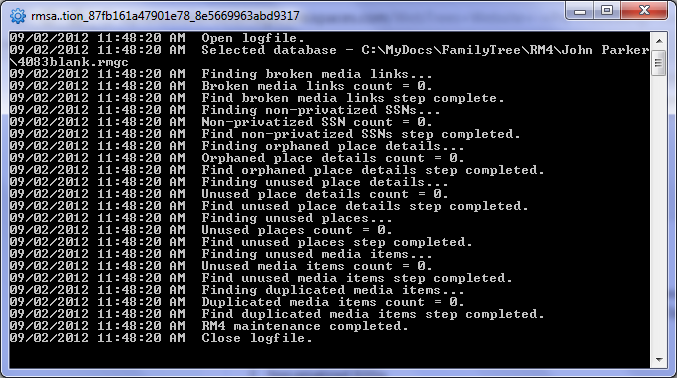
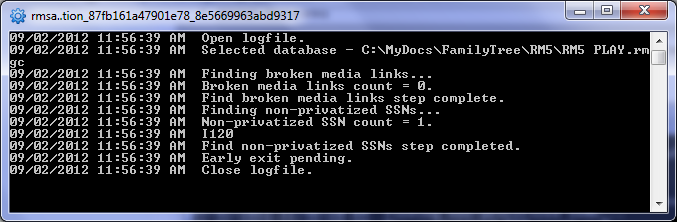
If all tests pass, the console window screen looks similar to this:

RMSanityOK.PNG
RMSanity: all tests passed.

As written, the application stops testing with the first test failed:
RMSanityFail.PNG
Each failed test then lists the information with which you can find and fix the problem using RootsMagic. In the above example, the individual with RIN 120 (I120) has a SSN fact that has not been privatized and so would be exported in the GEDCOM possibly to a website. Clearing all reported problems is Tom’s objective before exporting to his webtrees website. The log file contains exactly what you see on the screen so that you can refer to it as you work through the problems.

To close the application, DO NOT USE the windows X if you do not wish to be alarmed by an error message. Type ‘exit’ into the RMSanity screen and press Enter.

Download and Installation

Caveat Emptor

The first thing Tom says is that he developed RMSanity for his own use and purposes. If it is of use to anyone else, great, but he cannot support it. Use at your own risk! Risk is negligible because it is a read-only application that does not modify the database.

That said, this Tom thought it would be of interest to some and perhaps stimulate some others into further development of utilities in support of our use of RootsMagic. That RMSanity is in Visual Basic while the intent has been to develop the Bundled Utilities in Visual C# ought not be a deterrent – concepts are transferable if code is not. Those more comfortable with Visual Basic may find that the RMSanity source code is a great place to start.

Prerequisites

RMSanity uses the version of SQLite that requires Windows .NET 4 Framework (not just the Client). Install .NET 4 Framework.

Download

RMSanity.zip

Installation

Extract all the files under the Publish folder to a temporary folder. Find and click on setup.exe in the temporary folder. The installation will add a RMSanity folder to your start menu with a link to rmsanity.exe.

Won’t run?

Probably the same problem and solution as described for RMtrix.

Source code

Open Module1.vb to view the Visual Basic source code.

Discussions & comments from Wikispaces site


LessTX

Simple Understanding

LessTX
13 February 2012 23:26:32

I’m going to try to translate that page into what a typical end user might understand, tell me where I’m wrong:

This program checks your database for inconsistencies and unused items, and then alerts you to things you want to fix.

So, to compare it to the TMG Utility (the only 3rd party genealogy utility with which I am familiar), it would have 7 items on the list
(Broken media links, Non-privatized SSNs, Orphaned place details, Unused media items, Unused place details, Unused places, Duplicate media items) and be the “log only” option. It doesn’t actually change the database in any way.

These 7 things seem like very good items to have on the wish list for the utility program, but there would need to be the step of “fixing” those things within the utility.

Excellent stuff!


ve3meo

ve3meo
14 February 2012 02:29:47

That’s it in a nutshell, Less.

Media List Query #media #filenames #msexcel #date #person #family #events #sources #citations #places #placedetails

Description

One query lists all the media files in the RM4 Media Gallery and the ID of the Person, Family, Event, Source, Citation or Place to which each is linked. Used in conjunction with other queries, one can look up the media item or find the details about the item to which the media are attached. For example, the Source List query indicates if there are media items attached to a citation. Given the citation ID from the Source List query, one can readily find all the media items with that OwnerID in the Media List query results. Conversely, a media item may be attached to multiple items – this query helps to find each one by reporting the type and ID of the objects to which it is attached.

SQLite managers have differing capabilities in manipulating the results. SQLite Expert Personal can display thumbnail images but wraps the text contents of cells and prints “<null>” in empty cells; it has useful filtering and sorting so its display can be cluttered or effective, depending on selections. SQLiteSpy does not display thumbnails nor filter nor wrap but sorts quickly and produces a very clean display. Both allow you to select just the columns you want displayed for a less crowded screen. From either one, results can be copied and pasted into Excel, enabling a hyperlink to the media file produced by the query.

Download

MediaList.sql for RM4. MediaList-RM5.sql for RM5.

Screenshots

SQLiteExpert

MediaList-ExpertScreenshot.PNG
Screenshot from SQLite Expert Personal. Requires horizontal scrolling to see rest of columns. Narrowing causes row height to expand. De-selecting columns can simplify the display.

SQLiteSpy

MediaList-SpyScreenshot.PNG
Screenshot from SQLiteSpy. No wrapping so narrowing columns does not affect row height but must select cell to view its full content. Deselecting columns can simplify the display.

Column Definitions

TBA

Source Template, A Better Free Form #sourcetemplates #sources #search #replace

For a comprehensive comparison of the outputs from !MyFreeForm3, built-in and custom source templates, and Free Form see A Trio of Templates.

A Better Free Form Source Template

Give me a template that is easy to use, produces good full and short footnotes without extraneous punctuation and exports cleanly via GEDCOM to other software!
WARNING: This page has been extensively updated since 14 Oct 2011. !MyFreeForm3 supersedes !MyFreeForm and !MyFreeForm2 templates which are deprecated due to potential duplicating of the key term in the GEDCOM export along with an unwanted period.

RM4’s Source Templates are a boon and frustrating at the same time. If you can choose the right one for a given source from some 417 different templates, use it correctly, you do end up with a footnote and bibliography style that is pretty consistent with what the gurus advise it should be. That’s great for reports and websites generated from within RM4 but what gets exported to a standard GEDCOM for use by some other software is often pretty badly messed up.

The built-in Free Form template does a better job on exporting, you have total control over what gets into the TITL and PAGE tags, only limited by the order in which the tags are used to create footnotes. However, the Free Form template falls down in RM reports when a source is repeatedly cited, because there is only one Source Details field, Page, used by both the full, first footnote and by subsequent short footnotes. Thus, if lots of detail (e.g., think of a census citation) is entered in the Page field to ensure that the particular location within a source can readily be found, that same lengthy detail gets repeated in the subsequent short footnotes.

I have wrestled at length to come up with a Source Template that minimizes constraints (fewest fields=max flexibility), provides a short footnote if needed, exports nicely to standard GEDCOM, and has no extraneous punctuation. That has not been easy, given RM4’s idiosyncrasies. I believe !MyFreeForm3 is about the best that one can do. This custom template mimics the built-in Free Form template, adding one field in Source Details: Key: [ShortPage], for use in Short Footnotes instead of Details:[Page] (renamed from Page:[Page]). It also provides an additional field Punctuation:[Punc] in the Master Source with which you can override the default “, ” separator in the footnote between master source and source details.

!MyFreeForm3-Edit_Source_screenshot.png
Example of a source in !MyFreeForm3

Import this Source Template

Download the template file !MyFreeForm3.rmst to your computer. From RM4 main screen, select Lists > Source Templates to open the Source Templates window. Then select Import and browse to locate and select the .rmst file. If the new template was imported, at or near the top of the list of Source Types, you should see !MyFreeForm3. It’s now available for the creation of new sources.

Using !MyFreeForm3

Guidance on entering data

  1. For Footnote, Short Footnote and Bibliography, follow the same practices as you would with the Free Form template, but do not end any with a period.
  2. The Punctuation field only affects footnotes in RM4 generated reports, not exports. Plug in a character to see the effect in the right pane.
  3. The two Source Details fields can be both filled, both null, or either one filled. Only when both are filled will the resulting footnote and short footnote differ in any way other than what you have defined in the corresponding Master Source fields. Filling neither or one is equivalent to the Free Form template.
  4. Ending footnotes with a period is pretty standard. Due to an export issue, the template must not automatically supply it. You provide the ending period at the end of the bottom-most Source Details field you use. If both Source Details fields are empty, the footnote will not end with a period (sorry, there’s no way around it).
  5. On export, RM4 is going to stuff “; ” between non-null Details:[Page] and Key:[ShortPage] which it puts into the PAGE tag. For consistency, that’s what the full Footnote sentence template does, too.

Compose draft source with other templates

To mimic in !MyFreeForm3 the EE et al footnotes as well as one can, I try using a two-stage procedure. First, I’ll use a Source Template suited to the type of source I am citing as a guide for how I may write a !MyFreeForm source. I fill in the fields of the selected template to generate the full and short footnotes and bibliography in the side panel, and copy these results to a word processor. Then I can parse the footnotes into their Master Source values (Footnote and ShortFootnote) and into their Source Details values (Details:[Page] and Key:[ShortPage]). Having done that, then I cancel the source creation and start over with the !MyFreeForm template, copying the values into the corresponding fields. That results in footnotes that resemble, to some degree, the gurus’ footnotes, at least to the same level of detail, if not order.

Copy draft citations from Ancestry.com et al

Lots of sites provide citations of their resources and there are online Citation Machines. In effect, they have used their own templates. Breaking them down into component parts is the same as for the draft sources created using RM4 source templates, described above. It’s a whole lot easier to parse them into !MyFreeForm3 than any other RM4 template, save the Free Form.

Examples

Have a look at this page for an example of a !MyFreeForm3 template used for the 1930 US Census: Source Template, A Better Free Form – Examples
and at the discussion below for an example of a directory as a source.

Merging

Merging of Free Form sources into !MyFreeForm3 sources is lossless, datawise. All the fields of Free Form are duplicated in !MyFreeForm3; only the Punctuation:[Punc] and Key:[ShortPage] fields are unique and will remain empty after the merge. However, to take advantage of the better Short Footnote, you will have to take out the key value from the Details:[Page] field and put it into the Key:[ShortPage]field of each citation. As long as Key:[ShortPage] remains empty, the Short Footnote will come out essentiallly the same as from Free Form.

Global Conversion to !MyFreeForm3

Global conversion of Free Form sources to !MyFreeForm3 sources is easily and quickly done using SQLite. Open the database with your SQLite manager and inspect SourceTemplateTable for the value !MyFreeForm3 in the Name column. It will be at or near the bottom of the table with a TemplateID of 10000 or greater. Copy the following queries, edit them to plug in the TemplateID of !MyFreeForm3 in your database in place of YourTemplateID and run the queries to map all your FreeForm sources to the !MyFreeForm template:

-- Map Free Form sources to !MyFreeForm3 source template
UPDATE SourceTable SET TemplateID=YourTemplateID WHERE TemplateID=0
;
-- Add a [ShortPage] definition to every citation of a !MyFreeForm3 source lacking one
--  else you will see the text "[ShortPage]" outputted in RM4 reports
UPDATE CitationTable
 SET FIELDS = CAST(REPLACE(CAST(FIELDS AS TEXT),'</Fields>', '<Field><Name>ShortPage</Name><Value/></Field></Fields>') AS BLOB)
  WHERE CitationID IN
   (SELECT CitationID FROM CitationTable C JOIN SourceTable S USING(SourceID)
     WHERE TemplateID=YourTemplateID AND CAST(C.FIELDS AS TEXT) NOT LIKE '%<Name>ShortPage%'
    )
;
-- A similar update of the SourceTable is required for the [Punc] field of !MyFreeForm3
--  else you will see the text "[Punc]" outputted in RM4 reports
UPDATE SourceTable
 SET FIELDS = CAST(REPLACE(CAST(FIELDS AS TEXT),'<Field><Name>ShortFootnote', '<Field><Name>Punc</Name><Value/></Field><Field><Name>ShortFootnote') AS BLOB)
  WHERE SourceID IN
   (SELECT SourceID FROM SourceTable S
     WHERE TemplateID=YourTemplateID AND CAST(S.FIELDS AS TEXT) NOT LIKE '%<Name>Punc%'
    )
 

Follow up to enter values in the Key:[ShortPage] field of each citation that needs an improved short footnote, and take out the duplicate values from the Details:[Page] field.

How to find citations needing an improved Short Footnote

This section focuses on sources that have been globally converted to the !MyFreeForm3 templates.

Inspecting the Source List Report

For all source types and sources, one could create a RM4 Report > List > Source List including the Short Footnote and Citation Details (but not Detail Text, Comment and Media as that may clutter the report). Unfortunately, this report cannot be filtered by type of Source Template so you would find sources using the !MyFreeForm templates by searching for the term “[ShortPage]” in the report. It occurs in both the Footnote and the Short Footnote line. Doubly unfortunately, this report makes it hard to tell if a Key:[ShortPage] value has been entered, but you can use it to look for lengthy citations used more than once and thus likely to incur the use of the Short Footnote. Since the person and fact are identified in the Citation list for a Source in this report, you can then edit each citation accordingly. Best to fix one, Memorize it, Paste it into the other facts that use it, compare the original for differences in Detail Text, Comment and Media and resolve them on the copy, then delete the old. That guarantees that the key citation properties are truly identical so that Short Footnote and Ibid will come into play.

MyFreeForm3-Source_List_example_screenshot.png
“Example from Source List Report having a //ShortPage// field and therefore uses the !MyFreeForm3 template.

This screenshot from the Source List report shows that both Footnotes contain the [ShortPage] field so this is a !MyFreeForm3 source. It has two identical citations for facts about the same person so will surely use either the Short Footnote or Ibid in reports. It also has citation or source detail values for both the Details:[Page] and the Key:[ShortPage] but it is hard to tell because they are merely separated by a semi-colon. Lengthier citations with embedded semi-colons are even tougher to deconstruct into the two fields. If there is no obvious key value repeated, then either

  1. [ShortPage] is null and the short footnote may be as verbose as the full one. The absence of any semi-colon “; ” in the citation is absolute confirmation but the opposite is not necessarily true.
  2. This is a properly parsed !MyFreeForm3 citation. The absence of any semi-colon “; ” in the citation is absolute refutation but the opposite is not necessarily true.

Not overly helpful…

An SQLite query showing unparsed Source Details, longest first

Of course, SQLite could help in this process. I adapted an earlier query to produce the following report which shows the length (LenDet) of the field containing the [Page] value with a null value in [ShortPage].

Sources_by_Length_of_Detail_-_screenshot.png
Screenshot from SQLiteSpy of !MyFreeForm sources lacking a //ShortPage// value, in descending order of the length of the field containing the //Page// value.

Sorted in descending order, I work from the top down, re-running the query after each editing and replacement of duplicate citations (those with the same length most likely have identical values). Thus, the most verbose citations are tackled first. Some 156 characters out of the total shown under LenDet are used by XML tags, as can be seen at the bottom of the screen – that’s the value of the highlighted cell which contains the values of all the fields in Source Details. Download SourcesByDetailLength.sql

Discussions and comments from Wikispaces site


Geraniums

!MyFreeForm3 template

Geraniums
05 December 2011 18:01:37

If I share my database with others (some weeks another person enters data, other weeks a 2nd person enters data, etc), then we should all import your enhanced free form template (!MyFreeForm3), is that correct?

When RootsMagic has an update, does the template stay in the program? Would I ever need to re-import it?

How do I download your template? I clicked here, but then what?
!MyFreeForm3.rmst

Thanks!


ve3meo

ve3meo
05 December 2011 20:45:40

Once a custom template is imported into a database file, it stays there until deleted and cannot be deleted if it is in use by a source. If you share the database FILE, then everyone will see it. If a person having a source using a custom source template is transferred by drag and drop or by GEDCOM (including RM-specific features), the custom template spec is also transferred.

When an RM update or new release updates a database, it historically has preserved custom templates.

You should only need to re-import to a new database.

To download, right-click on the link and select ‘Save target as’, directing the save to a convenient place on your hard drive. Then follow the instructions in Help > custom source templates to import it into Lists > Source Templates.

Hope that’s clear and would appreciate your observations and experience in using the template.

Tom


Geraniums

How to use the new free form template

Geraniums
30 December 2011 19:00:05

Can I please have more examples of how to enter information in the different fields? And how the sentences read afterward.

I’m not sure what “key” means, or what type of punctuation gets entered. Where would the year of a publication be entered?

Thanks


ve3meo

ve3meo
30 December 2011 21:15:41

Using the labels beside each data entry field and enclosing them in square brackets to signify the variable data values one enters into the fields, here is what the resulting report sentences would look like:

Footnote: [footnote]<,|[punctuation]> [preamble]; [key]
Short Footnote: [shortfootnote]<,|[punctuation]> [key]
Bibliography: [bibliography].

This <,|[punctuation]> indicates that a comma will be used by default, else the character(s) you enter into the Punctuation field, such as a colon (:) or semi-colon (;); easiest to leave it empty as a comma is the most common punctuation.

I would urge you to actually try the template on a Play database so that you get the feel of it. The sentences will read the way you want them within the constraint that the Source Details always follow the Master Source data. And it’s not very different from Free Form, except for the resulting Short Footnote.

I used the term “Key” to indicate the most specific piece(s) of the Source Details that one would want in the Short Footnote and the term “Details” for the rest of the Source Details that show up with “Key” only in the long Footnote.

Year of publication would most commonly be entered in the Footnote field.

Here’s an example:
[footnote]: Lovell’s Canadian Dominion directory for 1871 (Montreal: J. Lovell, 1871); microform digital image, Canadiana.org, Internet Archive (https://www.archive.org/details/cihm_09143 : downloaded 7 April 2011)

[shortfootnote]: Lovell’s Canadian directory, 1871

[details]: entry for Sinclair Holden, Markham

[key]: page 518.

Resulting footnotes:
Footnote:
Lovell’s Canadian Dominion directory for 1871 (Montreal: J. Lovell, 1871); microform digital image, Canadiana.org, Internet Archive (https://www.archive.org/details/cihm_09143 : downloaded 7 April 2011), entry for Sinclair Holden, Markham; page 518.

Short Footnote:
Lovell’s Canadian directory, 1871, page 518.

I left [punctuation] empty so it defaulted to comma and I omitted Bibliography as it involves no other fields.

Hope that comes out on the Discussion page okay and is helpful. Glad you’re taking an interest.

Tom


RWells1938

Example

RWells1938
01 January 2012 12:47:07

Tom

Could you give a example on how you use your free from source using a 1930 census?

thanks
Roger


ve3meo

ve3meo
01 January 2012 20:56:33

Roger, I have done the example you requested as a PDF that is linked from the Page. If you look at its Table of Contents for “Examples”, you will readily find it.

Tom

All Citations & Dupes Count – Query #citations #duplicates

Download: AllCitations+Dupes.sql 2010-07-07
Revised:
2012-02-23 to accelerate family fact citations by 200:1 (in one case)
2011-11-04 to correct spouse and family fact citations

AllCitations+Dupes.png

Discussions & comments from Wikispaces site


Geraniums

Runs too long?

Geraniums
23 February 2012 12:03:32

I tried running this query, and it ran for nearly an hour and still no results were displayed. There doesn’t seem to be a Stop or Cancel button in SQLiteSpy (3.6.23)?

Running it on RM5 database using Win 7 32 bit.

File > Close Database – gave an error message that it’s still running.

File > Exit – didn’t close the program.

Had to cancel with task manager.


Geraniums
Geraniums
23 February 2012 12:04:42

What I was hoping to do was run a query for checking for duplicate citations.

You had helped me with that in 2010, and had given me this code, which works well:

— AllCitations+Dupes.sql
— 2010-07-07 by ve3meo
— based on AllCitations.sql, using a similar procedure to build a temporary
— table of all citations from which a subsequent query in the script
— can display specific results – in this case a summary report
— showing all sources cited against a person sorted by the numbers
— of duplicate citations.
— N.B. some SQLite managers may fail to display any results; it will be necessary to
— execute the last SELECT as a sub-query using whatever technique the manager
— provides, e.g., highlighting the command to be executed while the temporary
— table still exists.
— To Do – maybe use eventtable.SortDate as a sorting criterion instead of Date
— 2011-11-04 ve3meo corrections for spouse, and family fact citations and multiples due Alt Name
—
— BEGIN
— all Personal citations for Individual
DROP TABLE IF EXISTS tmpCitations;
CREATE TEMP TABLE tmpCitations AS
SELECT c.CITATIONID AS CitID, c.sourceid AS SrcID, n.ownerid AS RIN, n.IsPrimary AS Uniq, n.surname COLLATE NOCASE AS Surname, n.suffix COLLATE NOCASE AS Sfx, n.prefix COLLATE NOCASE AS Pfx, n.given COLLATE NOCASE AS Givens, n.birthyear AS Born,
n.deathyear AS Died, Null AS EvtID, ‘Personal’ AS Citer, Null AS EvtDate,
s.NAME COLLATE NOCASE AS Source, s.refnumber AS SrcREFN, s.actualtext AS SrcTxt, s.comments AS SrcComment, s.fields AS SrcFlds,
c.refnumber AS CitREFN, QUOTE(c.actualtext) AS CitTxt, QUOTE(c.comments) AS CitComment, c.fields AS CitFlds
FROM citationtable c
LEFT OUTER JOIN sourcetable s ON c.sourceid=s.sourceid
LEFT OUTER JOIN persontable p ON c.ownerid=p.personid
LEFT OUTER JOIN nametable n ON p.personid=n.ownerid
WHERE c.ownertype=0 AND +n.IsPrimary=1
;
INSERT INTO tmpCitations
— all Fact citations for Individual
SELECT c.CITATIONID, c.sourceid AS SrcID, n.ownerid AS RIN, n.IsPrimary, n.surname COLLATE NOCASE , n.suffix COLLATE NOCASE , n.prefix COLLATE NOCASE , n.given COLLATE NOCASE , n.birthyear,
n.deathyear, e.EventID AS EvtID, f.NAME AS Citer, e.Date AS EvtDate,
s.NAME COLLATE NOCASE , s.refnumber, s.actualtext, s.comments, s.fields AS SrcFlds,
c.refnumber, c.actualtext, c.comments, c.fields AS CitFlds
FROM citationtable c
LEFT OUTER JOIN sourcetable s ON c.sourceid=s.sourceid
LEFT OUTER JOIN eventtable e ON c.ownerid=e.eventid
LEFT OUTER JOIN persontable p ON e.ownerid=p.personid
LEFT OUTER JOIN nametable n ON p.personid=n.ownerid
LEFT OUTER JOIN facttypetable f ON e.eventtype=f.facttypeid
WHERE c.ownertype=2 AND e.ownertype=0 AND f.ownertype=0 AND +n.IsPrimary=1
;
INSERT INTO tmpCitations
— all Spouse citations for Father|Husband|Partner 1
SELECT c.CITATIONID, c.sourceid AS SrcID, n.ownerid AS RIN, n.IsPrimary, n.surname, n.suffix, n.prefix, n.given, n.birthyear,
n.deathyear, NULL AS EvtID, ‘(Spouse)’ AS ‘Name’, NULL AS EvtDate,
s.NAME, s.refnumber, s.actualtext, s.comments, s.fields AS SrcFlds,
c.refnumber, c.actualtext, c.comments, c.fields AS CitFlds
FROM citationtable c
LEFT OUTER JOIN sourcetable s ON c.sourceid=s.sourceid
LEFT OUTER JOIN familytable fm ON c.ownerid=fm.FamilyID
LEFT OUTER JOIN persontable p ON fm.fatherid=p.personid
LEFT OUTER JOIN nametable n ON p.personid=n.ownerid
— LEFT OUTER JOIN eventtable e ON e.ownerid=fm.familyid
— LEFT OUTER JOIN facttypetable f ON e.eventtype=f.facttypeid
WHERE c.ownertype=1 — AND e.ownertype=1 AND f.ownertype=1
AND +n.IsPrimary=1
;

INSERT INTO tmpCitations
— all Couple Event citations for Father|Husband|Partner 1
SELECT c.CITATIONID, c.sourceid AS SrcID, n.ownerid AS RIN, n.IsPrimary, n.surname, n.suffix, n.prefix, n.given, n.birthyear,
n.deathyear, e.EventID AS EvtID, f.NAME, e.Date AS EvtDate,
s.NAME, s.refnumber, s.actualtext, s.comments, s.fields AS SrcFlds,
c.refnumber, c.actualtext, c.comments, c.fields AS CitFlds
FROM citationtable c
LEFT OUTER JOIN sourcetable s ON c.sourceid=s.sourceid
LEFT OUTER JOIN familytable fm ON c.ownerid=e.EventID
LEFT OUTER JOIN persontable p ON fm.fatherid=p.personid
LEFT OUTER JOIN nametable n ON p.personid=n.ownerid
LEFT OUTER JOIN eventtable e ON e.ownerid=fm.familyid
LEFT OUTER JOIN facttypetable f ON e.eventtype=f.facttypeid
WHERE c.ownertype=2 AND e.ownertype=1 AND f.ownertype=1 AND +n.IsPrimary=1
;

INSERT INTO tmpCitations
— Citations for Alternate Names
SELECT c.CITATIONID, c.sourceid AS SrcID, n.ownerid AS RIN, NOT n.IsPrimary, n.surname, n.suffix, n.prefix, n.given, n.birthyear,
n.deathyear, Null AS EvtID, ‘Alternate Name’ AS Citer, Null AS EvtDate,
s.NAME AS Source, s.refnumber, s.actualtext, s.comments, s.fields AS SrcFlds,
c.refnumber, c.actualtext, c.comments, c.fields AS CitFlds
FROM citationtable c
LEFT OUTER JOIN sourcetable s ON c.sourceid=s.sourceid
LEFT OUTER JOIN nametable n ON n.nameid=c.ownerid
WHERE c.ownertype=7 AND +n.IsPrimary=0
;

— Display summary results, in descending order of duplications
SELECT RIN, Surname || ‘ ‘ || Sfx || ‘, ‘ || Pfx || ‘ ‘ || Givens || ‘ (b’ || Born || ‘-d’ || Died || ‘)’ AS Person, Citer, EvtDate, COUNT(1)-1 AS Dupes, Source FROM tmpcitations
WHERE uniq=1 OR uniq ISNULL
GROUP BY RIN, EvtID, Citer , SOURCE, SrcREFN, SrcTxt, SrcComment, SrcFlds, CitREFN, CitTxt, CitComment, CitFlds
ORDER BY Dupes DESC, RIN, EvtDate
;
— END

Bundled Utilities Project

As of 2012 and following the release of RootsMagic 5, a small team of enthusiasts is embarking on a software project to consolidate the various SQLite queries reported on this wiki into a user-friendly application, accessible to more RootsMagic users. Additional utilities will, hopefully, be added once the basics are running. The project team is ad hoc, led by Steve Turley, and welcomes your input.

This page provides links to the various pages of discussion, examples, etc. return frequently to monitor progress.

RootsMagic Utilities at https://rmutils.wordpress.com/ the plain language blog and navigation hub for the project set up by LessTX. (Gone)

Related pages:
Bundled Utilities – RMtrix Tom Holden’s 1st gen RMtrix app in Visual C#.
WebTrees Website – Pre-Processing Tools using SQLite in Visual Basic et al Tom Davis’ RMSanity app in Visual Basic
SplitTree Steve’s first utility, developed in Visual C#, that got the ball rolling
Which Platform for RootsMagic Utilities? discussion that settled on continuing with Visual C# for prototyping; other matters.
Bundled Utilities Project Name suggestions and a poll. Get your 2 cents in!
Bundled Utilities – Groupings suggested groupings of utilities/functions under a menu structure; ongoing.
Bundled Utilities – Example content a look at TMG Utiltiy and Ltools for ideas of what to include and how to structure the program
A Proposal for a Named Group and Color Manager – a standalone utility offering major enhancements to these functions, being developed by Jerry Bryan, bundling later.
Wish List – post your wishes for utilities as a message in the Discussion area of this page

Discussions & comments from Wikispaces site


LessTX

The Public Face of the Project

LessTX
20 January 2012 17:03:01

This site is working fine as the development hub, but of course we’ll need a public face to promote and distribute the product, and to gain a larger alpha/beta test group etc.

I’m thinking website/blog, FB and G+ pages, and twitter account.

Some permission and or clearance should be gained from RMHQ with regard to using the RM name, perhaps a modified version of the logo (with a hammer overlay or somesuch), appropriate disclaimers, linkbacks, etc.

Has anyone talked with RM/Bruce about this project?


ve3meo

ve3meo
24 January 2012 02:46:18

Sounds like the right things to do – maybe a little early at this point.

I’ve had email contact with Bruce – no formal request for permission but keeping him informed. No objection other than Tech Support cannot support a user who modifies the database. In the blog leading up to RM4, they talk about their open source database. And he has indicated to me that he would consider offering a SDK when RM was stable.

My other concern has to do with the RMNOCASE collation which Bruce has declined to release to me because of outstanding bugs. It’s proprietary and there is some risk if we do not use exactly the same. Steve has allayed my concern somewhat with his report on his fake RMNOCASE (seems better than my SQLiteSpy extension) and may have more to say on that point.


Check RootsMagic Database Integrity #pragma #database #integrity

This page applies mainly to RootsMagic 4. RM5 incorporates the SQLite tools Integrity Check, Reindex, and Vacuum under the menu File > Database Tools > Test database integrity | Rebuild indexes | Compact database. However, it is not apparent that the Integrity Check is done automatically on start-up so users would be well advised to do it periodically. Now that there is an integral Integrity Check, we have learned that some modifications to the database using a SQLite manager having a substitute RMNOCASE collation results in index errors. Therefore, users of SQLite queries are warned:

  1. If using RM4, avoid queries that modify fields collated with RMNOCASE.
  2. If using RM5, reindex with the SQLIte manager before running the query; then reindex using RM5 before using it to make other changes to the database or major reports.

Why?

As of RootsMagic 4.0.8.4, there is no built-in mechanism to check the integrity of a RootsMagic database. Some users have encountered SQLite error messages while using RootsMagic, the most terrifying of which is SQLite Error 11 – Database disk image is malformed. It can render the database unusable, or, at best, only parts of it usable. The database has been corrupted in some way and may be undetected for months until some procedure causes the SQLite database engine to attempt to access the corrupted area. Ever since the corruption enters, RootsMagic backups faithfully preserve it. For a real example, read the discussion on the RootsMagic forum in the topic Corrupt Database, Backups & Recovery Therefrom. Had there been a convenient check of the integrity of the database used routinely, the corruption would have been caught much earlier. Corrective action could have been taken sooner and perhaps the cause identified, given a fresh memory of the events preceding. There is no reason why such an integrity check cannot be incorporated in the RootsMagic application on the opening of a database; that’s where it should be done. Until the software is upgraded to do so, there are tools that can be used outside RootsMagic 4 to validate the integrity of its SQLite databases.

How?

Jump right in by reading How to query RootsMagic which just happens to use one of the following SQL commands to carry out an integrity check. Make an integrity check an integral part of opening your database by following the outline in Check RootsMagic Database Integrity on Opening.

The SQLite database engine incorporates two SQL commands that carry out a more or less comprehensive integrity check. From the on-line manual:

  • PRAGMA integrity_check;
    PRAGMA integrity_check(integer)

This pragma does an integrity check of the entire database. It looks for out-of-order records, missing pages, malformed records, and corrupt indices. If any problems are found, then strings are returned (as multiple rows with a single column per row) which describe the problems. At most integer errors will be reported before the analysis quits. The default value for integer is 100. If no errors are found, a single row with the value “ok” is returned.

  • PRAGMA quick_check;
    PRAGMA quick_check(integer)

The pragma is like integrity_check except that it does not verify that index content matches table content. By skipping the verification of index content, quick_check is able to run much faster than integrity_check. Otherwise the two pragmas are the same.

These SQL command lines can be run by any SQLite manager against a RootsMagic database opened by the manager with one big exception: indices can only be checked if SQLite can access a collation sequence named RMNOCASE, a name and collation unique to RootsMagic and embedded in the application. Thus, PRAGMA integrity_check will fail unless the SQLite manager has the means to add a collation sequence so named. SharpPlus SQLite Developer (not the free version) is one that can. Of course, RootsMagic should be capable of doing this full test of integrity as it has the RMNOCASE collation.

That leaves the partial test, PRAGMA quick-check, as the one that we can use on RootsMagic database files with any SQLite manager. And this may suffice, because even an ’empty’ RootsMagic database is reported to have 13 missing rowid’s from index idxSourceTemplateName – ‘OK’ would never be an output from integrity_check.

Comparison of outputs for a corrupted RootsMagic database

PRAGMA integrity_check; PRAGMA quick_check;
On tree page 10429 cell 0: 2nd reference to page 16050
On tree page 4494 cell 112: 2nd reference to page 16050
On tree page 4494 cell 112: Child page depth differs
On tree page 4494 cell 113: Child page depth differs
On tree page 16048 cell 0: Rowid 2285 out of order (max larger than parent max of 800)
On tree page 11057 cell 3: Rowid 801 out of order (min less than parent min of 2285)
On tree page 10892 cell 0: 2nd reference to page 16050
On tree page 11617 cell 67: 2nd reference to page 16051
On tree page 11617 cell 67: Child page depth differs
On tree page 11617 cell 68: Child page depth differs
On tree page 11548 cell 0: 2nd reference to page 16045
On tree page 15783 cell 1: 2nd reference to page 16045
On tree page 12446 cell 53: 2nd reference to page 16048
On tree page 12446 cell 53: Child page depth differs
On tree page 12446 cell 54: Child page depth differs
Page 11154 is never used
Page 11155 is never used
Page 15429 is never used
Page 15430 is never used
Page 16054 is never used
Page 16055 is never used
Page 16056 is never used
Page 16057 is never used
rowid 55 missing from index idxSourceTemplateName
rowid 172 missing from index idxSourceTemplateName
rowid 190 missing from index idxSourceTemplateName
rowid 241 missing from index idxSourceTemplateName
rowid 296 missing from index idxSourceTemplateName
rowid 297 missing from index idxSourceTemplateName
rowid 326 missing from index idxSourceTemplateName
rowid 333 missing from index idxSourceTemplateName
rowid 345 missing from index idxSourceTemplateName
rowid 401 missing from index idxSourceTemplateName
rowid 21 missing from index idxSourceName
rowid 61 missing from index idxSourceName
rowid 63 missing from index idxSourceName
… cont’d for total of 1026 ‘rowid # missing…’
On tree page 10429 cell 0: 2nd reference to page 16050
On tree page 4494 cell 112: 2nd reference to page 16050
On tree page 4494 cell 112: Child page depth differs
On tree page 4494 cell 113: Child page depth differs
On tree page 16048 cell 0: Rowid 2285 out of order (max larger than parent max of 800)
On tree page 11057 cell 3: Rowid 801 out of order (min less than parent min of 2285)
On tree page 10892 cell 0: 2nd reference to page 16050
On tree page 11617 cell 67: 2nd reference to page 16051
On tree page 11617 cell 67: Child page depth differs
On tree page 11617 cell 68: Child page depth differs
On tree page 11548 cell 0: 2nd reference to page 16045
On tree page 15783 cell 1: 2nd reference to page 16045
On tree page 12446 cell 53: 2nd reference to page 16048
On tree page 12446 cell 53: Child page depth differs
On tree page 12446 cell 54: Child page depth differs
Page 11154 is never used
Page 11155 is never used
Page 15429 is never used
Page 15430 is never used
Page 16054 is never used
Page 16055 is never used
Page 16056 is never used
Page 16057 is never used

Discussions & comments from Wikispaces site


JP-RM

Why checking RM database integrity proved very useful

JP-RM
02 June 2010 14:23:30

In early April 2010 I suffered an “SQLite error 11 – database disk image is malformed”. Although never encountered before, all of a sudden practically any addition to my RM data resulted in this error. In addition it then proved impossible to shutdown RM unless I reverted to using the Windows Task Manager.

Given that my data had been built up over several years, the implications of this error were most worrying. What to do?

I had only just upgraded from RM 4.0.7.1 to 4.0.8.0, so this was the most obvious aspect to investigate. So I raised a problem report with RM support, and attempted to describe a sequence of actions that they could use to attempt to recreate the problem.

I soon found that by creating a new empty database and making a few basic data additions, I seemed to be able to recreate the problem at will. However RM support were not able to cause the problem when they attempted recreation.

In parallel, as a result of my appends on the RM forums, I became aware of this website and received offers of use of some of the tools referenced here to investigate my data. At that stage, this just showed that my database was indeed corrupted.

Holidays and other activity then intervened, but I was hoping that RM support would come up with something useful. Unfortunately, nothing was forthcoming even though there were other uses who were starting to report the same (or a similar) problem.

Then RM forum activity started to point to this problem only occurring when RM was used by those running Windows on an Apple Mac. To be more precise, those using Parallels for Mac to enable Windows (XP SP3 in my case) to run at the same time as the native Mac OS X operating system. AND when the RM data was stored in a folder that was accessible from both Windows and Mac applications.

At this stage it was time to investigate more closely. Using the quick_check function of SQLiteSpy, I developed a simple and repeatable sequence of RM actions on a new empty RM database and ran quick_check every time the database changed (identified by the Date Modified in Windows Explorer). This showed exactly when a first database integrity error was caused. I assumed that this would lead in due course to an SQLite error 11 (but did not bother to go so far).

I then changed to using folders on the base XP virtual C-drive (not shared with Mac applications), ran the test sequence again, and the problem did not re-occur.

I also re-installed RM 4.0.7.1 and redid the tests, with exactly the same result. The problem again occurred when using shared folders. So the change to RM 4.0.8.0 – or by then 4.0.8.4 – was not the cause.

At this stage I then went back through my Mac data archive (Time Machine) to check exactly when RM maintenance and Parallels maintenance was applied. Then looking at when I had taken RM backups (I always take at least one per RM usage session on exiting RM) and looking at their file sizes and using the SQL in RMGC_TablesRowCouunt.sql to investigate their restores, I concluded that the error occurred the first time I added any additional data to my database after upgrading Parallels in mid-March (even though it was by then early April).

A quick investigation of the Parallels website then showed that there was indeed a problem with shared folder support in the level of Parallels I had upgraded to in mid-March (5.0.9344). Not only that, a fix was available (https://kb.parallels.com/en/8296) and applying it resulted in the problem disappearing.

To conclude, the problem was caused by using Parallels 5 at level 5.0.9344 and only when sharing the data folders used by RM between Windows and Mac applications.


One additional area that I found useful was the following:

RM backups have a date/time in Windows Explorer of when they were created. However, when a backup is restored, and BEFORE any change is made to the data, the date/time displayed in Windows Explorer will be the last time the data was modified, which MAY be earlier, both in time and date, than when the backup was taken. In my case this proved to be very useful as it showed that the data had not been modified between backups taken on different days. (Some days I just invoke RM to answer email queries, such that I won’t actually change the data on that day. RM (well Windows) does not update the last modified date/time in such cases.


RWells1938

Database Coruption

RWells1938
20 June 2011 17:40:56

Has anyone used the sqlite vaccume to clean up a RM4 database? Will this fix problems?

If so what do I need to have in order to do this?

Thanks
Roger


ve3meo

ve3meo
20 June 2011 18:08:30

VACUUM could repair corruption of an index, as would REINDEX. Vacuum also would return file space to the OS for other uses if a database has undergone many changes and deletions.

Unfortunately, VACUUM and REINDEX cannot be done without SQLite having access to all collation sequences used by the db indexes. What’s missing from all SQLite managers is the RMNOCASE collation sequence, proprietary and secret to RM4. I have successfully done both using SQLite Developer and renaming one of the Unicode collations but I don’t know if that may result in some downstream risk.

We need to keep urging Bruce and RootsMagic to incorporate VACUUM and REINDEX as user options. If they would provide a SQLite user interface within the program, those PRAGMA commands should automatically become accessible.


RWells1938

re: Database Coruption

RWells1938
20 June 2011 18:58:44

If I use a gedcom export and then import the gedcom what should I look for as possible data loss?

Roger


ve3meo

ve3meo
20 June 2011 19:51:21

If the database is corrupted, the export may fail; if it does not fail, I cannot predict if there would be any data loss due to corruption. OTOH, a RM4 GEDCOM export/import or a drag’n’drop is not yet perfectly transparent – there remain some subtle and not-so-subtle losses even if the database file is uncorrupted. Cannot say completely, but, as of 4.1.1.4, white space at the end of Notes is lost and there may be some issues yet with custom sentences, roles, …

Tom

Bundled Utilities Project Name #application

I like this:

RMtrix.png
RMtrix has a magical element to it in the sound alike to “tricks” with an appropriate implication as to what the software does – it carries out tricks on the RootsMagic database. Also can work as an acronym: RM obviously, tools or tricks, repairs, information, experiments or an algebraic unknown variable, x, or extras or external.
Combines a Perpetua font for “RM” similar to the current RootsMagic font followed by “trix” in the PR Celtic Narrow font.

Poll

What do you think? Vote in the poll. I picked out 10, the limit for a free poll, vote for any three or your own suggestion. Other voted suggestions, so far, are RMAlchemy, RMelixir and RM Utilities. If you like any of those, type it into Other.

If the poll does not show up on this page, you can to it directly at https://poll.fm/3gvet .

We need a good project name. One that will stick for as long as the project lasts. It needs to be tie into RootsMagic and have some buzz, not mundane like “RMtools”, although that’s pretty self-explanatory. I’m big on spinning off from the magical part of RootsMagic and its author, the RootsMagician, having named my local interest group, “The RootsMagic Wizards Guild”. In that spirit, I came up with this list of ideas:

Project Name Some definitions below from: https://www.neatorama.com/2009/01/14/magic-words-a-dictionary/ , others from Wiktionary et al.
RMabbazabba! A (abba) to Z (zabba), the alpha and omega
RMabracadabra!
RMalakazam!
RMexcelsior! Latin for ‘ever upward’
RMgaldor Old English form of Old Norse ‘galdr’ for ‘spell, incantation’, pl ‘galdrar’.
RMharrahya! likened to the shout of a martial artist delivering a knifehand strike, focusing power toward an amazing conclusion
RMinspiratum Latin for ‘inspired’
RMmatba! Found in 18th-century Kabbalistic treatises, matba is a magic word for obtaining small coins. It literally means “bring forth.”
RMpotions
RMpresto!
RMshazaam!
RMspells
RMsplz
RMta-da!
RMvividum Latin for ‘alive, vigorous’
RMvoilà!
RMwands
RMwiz
RMwizards

I rather like the way RMalakazam! rolls off the tongue with a little rhyme on the m’s; so does RMinspiratum, with a nice meaning. RMta-da! is succinct and punchy; also punchy is RMshazaam!

Version Monitoring #database #databaseproperties #datadefinitions

The database documentation was done largely on RootsMagic version 4.0.7.1. As far as we can tell, the database schema has not changed, as of version 4.1.2.1. Changes may be detected by opening a database created by each version with a SQLite manager; then exporting either a query of the full sqlite_master table or the database schema (just the SQL field of that table wrapped in a transaction) and comparing the exports from each version using a text editor that has a compare function (e.g. Notepad++).

The page Database System Catalog is the full sqlite_master table from 4.0.7.1, sorted by the tbl_name field.

For future comparisons, below is the schema from 4.0.8.4, downloadable from Empty4084Schema.sql and that of 4.1.2.1: Empty4121Schema.sql.

BEGIN TRANSACTION;
CREATE TABLE AddressLinkTable (LinkID INTEGER PRIMARY KEY, OwnerType INTEGER, AddressID INTEGER, OwnerID INTEGER, AddressNum INTEGER, Details TEXT );
CREATE TABLE AddressTable (AddressID INTEGER PRIMARY KEY, AddressType INTEGER, Name TEXT COLLATE RMNOCASE, Street1 TEXT, Street2 TEXT, City TEXT, State TEXT, Zip TEXT, Country TEXT, Phone1 TEXT, Phone2 TEXT, Fax TEXT, Email TEXT, URL TEXT, Latitude INTEGER, Longitude INTEGER, Note BLOB );
CREATE TABLE ChildTable (RecID INTEGER PRIMARY KEY, ChildID INTEGER, FamilyID INTEGER, RelFather INTEGER, RelMother INTEGER, ChildOrder INTEGER, IsPrivate INTEGER, ProofFather INTEGER, ProofMother INTEGER, Note BLOB );
CREATE TABLE CitationTable (CitationID INTEGER PRIMARY KEY, OwnerType INTEGER, SourceID INTEGER, OwnerID INTEGER, Quality TEXT, IsPrivate INTEGER, Comments BLOB, ActualText BLOB, RefNumber TEXT, Flags INTEGER, FIELDS BLOB );
CREATE TABLE ConfigTable (RecID INTEGER PRIMARY KEY, RecType INTEGER, Title TEXT, DataRec BLOB );
CREATE TABLE EventTable (EventID INTEGER PRIMARY KEY, EventType INTEGER, OwnerType INTEGER, OwnerID INTEGER, FamilyID INTEGER, PlaceID INTEGER, SiteID INTEGER, DATE TEXT, SortDate INTEGER, IsPrimary INTEGER, IsPrivate INTEGER, Proof INTEGER, STATUS INTEGER, EditDate FLOAT, Sentence BLOB, Details BLOB, Note BLOB );
CREATE TABLE ExclusionTable (RecID INTEGER PRIMARY KEY, ExclusionType INTEGER, ID1 INTEGER, ID2 INTEGER );
CREATE TABLE FactTypeTable (FactTypeID INTEGER PRIMARY KEY, OwnerType INTEGER, Name TEXT COLLATE RMNOCASE, Abbrev TEXT, GedcomTag TEXT, UseValue INTEGER, UseDate INTEGER, UsePlace INTEGER, Sentence BLOB, Flags INTEGER );
CREATE TABLE FamilyTable (FamilyID INTEGER PRIMARY KEY, FatherID INTEGER, MotherID INTEGER, ChildID INTEGER, HusbOrder INTEGER, WifeOrder INTEGER, IsPrivate INTEGER, Proof INTEGER, SpouseLabel INTEGER, FatherLabel INTEGER, MotherLabel INTEGER, Note BLOB );
CREATE TABLE GroupTable (RecID INTEGER PRIMARY KEY, GroupID INTEGER, StartID INTEGER, EndID INTEGER );
CREATE TABLE LabelTable (LabelID INTEGER PRIMARY KEY, LabelType INTEGER, LabelValue INTEGER, LabelName TEXT COLLATE RMNOCASE, Description TEXT );
CREATE TABLE LinkTable (LinkID INTEGER PRIMARY KEY, extSystem INTEGER, LinkType INTEGER, rmID INTEGER, extID TEXT, Modified INTEGER, extVersion TEXT, extDate FLOAT, STATUS INTEGER, Note BLOB );
CREATE TABLE MediaLinkTable (LinkID INTEGER PRIMARY KEY, MediaID INTEGER, OwnerType INTEGER, OwnerID INTEGER, IsPrimary INTEGER, Include1 INTEGER, Include2 INTEGER, Include3 INTEGER, Include4 INTEGER, SortOrder INTEGER, RectLeft INTEGER, RectTop INTEGER, RectRight INTEGER, RectBottom INTEGER, Note TEXT, Caption TEXT COLLATE RMNOCASE, RefNumber TEXT COLLATE RMNOCASE, DATE TEXT, SortDate INTEGER, Description BLOB );
CREATE TABLE MultimediaTable (MediaID INTEGER PRIMARY KEY, MediaType INTEGER, MediaPath TEXT, MediaFile TEXT COLLATE RMNOCASE, URL TEXT, Thumbnail BLOB );
CREATE TABLE NameTable (NameID INTEGER PRIMARY KEY, OwnerID INTEGER, Surname TEXT COLLATE RMNOCASE, Given TEXT COLLATE RMNOCASE, Prefix TEXT COLLATE RMNOCASE, Suffix TEXT COLLATE RMNOCASE, Nickname TEXT COLLATE RMNOCASE, NameType INTEGER, DATE TEXT, SortDate INTEGER, IsPrimary INTEGER, IsPrivate INTEGER, Proof INTEGER, EditDate FLOAT, Sentence BLOB, Note BLOB, BirthYear INTEGER, DeathYear INTEGER );
CREATE TABLE PersonTable (PersonID INTEGER PRIMARY KEY, UniqueID TEXT, Sex INTEGER, EditDate FLOAT, ParentID INTEGER, SpouseID INTEGER, Color INTEGER, Relate1 INTEGER, Relate2 INTEGER, Flags INTEGER, Living INTEGER, IsPrivate INTEGER, Proof INTEGER, Bookmark INTEGER, Note BLOB );
CREATE TABLE PlaceTable (PlaceID INTEGER PRIMARY KEY, PlaceType INTEGER, Name TEXT COLLATE RMNOCASE, Abbrev TEXT, Normalized TEXT, Latitude INTEGER, Longitude INTEGER, LatLongExact INTEGER, MasterID INTEGER, Note BLOB );
CREATE TABLE ResearchTable (TaskID INTEGER PRIMARY KEY, TaskType INTEGER, OwnerID INTEGER, OwnerType INTEGER, RefNumber TEXT, Name TEXT COLLATE RMNOCASE, STATUS INTEGER, Priority INTEGER, Date1 TEXT, Date2 TEXT, Date3 TEXT, SortDate1 INTEGER, SortDate2 INTEGER, SortDate3 INTEGER, Filename TEXT, Details BLOB );
CREATE TABLE RoleTable (RoleID INTEGER PRIMARY KEY, RoleName TEXT COLLATE RMNOCASE, EventType INTEGER, RoleType INTEGER, Sentence TEXT );
CREATE TABLE SourceTable (SourceID INTEGER PRIMARY KEY, Name TEXT COLLATE RMNOCASE, RefNumber TEXT, ActualText TEXT, Comments TEXT, IsPrivate INTEGER, TemplateID INTEGER, FIELDS BLOB );
CREATE TABLE SourceTemplateTable (TemplateID INTEGER PRIMARY KEY, Name TEXT COLLATE RMNOCASE, Description TEXT, Favorite INTEGER, Category TEXT, Footnote TEXT, ShortFootnote TEXT, Bibliography TEXT, FieldDefs BLOB );
CREATE TABLE WitnessTable (WitnessID INTEGER PRIMARY KEY, EventID INTEGER, PersonID INTEGER, WitnessOrder INTEGER, ROLE INTEGER, Sentence TEXT, Note BLOB, Given TEXT COLLATE RMNOCASE, Surname TEXT COLLATE RMNOCASE, Prefix TEXT COLLATE RMNOCASE, Suffix TEXT COLLATE RMNOCASE );
CREATE INDEX idxAddressName ON AddressTable (Name);
CREATE INDEX idxChildFamilyID ON ChildTable (FamilyID);
CREATE INDEX idxChildID ON ChildTable (ChildID);
CREATE INDEX idxChildOrder ON ChildTable (ChildOrder);
CREATE INDEX idxCitationOwnerID ON CitationTable (OwnerID);
CREATE INDEX idxCitationSourceID ON CitationTable (SourceID);
CREATE UNIQUE INDEX idxExclusionIndex ON ExclusionTable (ExclusionType, ID1, ID2);
CREATE INDEX idxFactTypeAbbrev ON FactTypeTable (Abbrev);
CREATE INDEX idxFactTypeGedcomTag ON FactTypeTable (GedcomTag);
CREATE INDEX idxFactTypeName ON FactTypeTable (Name);
CREATE INDEX idxFamilyFatherID ON FamilyTable (FatherID);
CREATE INDEX idxFamilyMotherID ON FamilyTable (MotherID);
CREATE INDEX idxGiven ON NameTable (Given);
CREATE INDEX idxLabelType ON LabelTable (LabelType);
CREATE INDEX idxLinkExtId ON LinkTable (extID);
CREATE INDEX idxLinkRmId ON LinkTable (rmID);
CREATE INDEX idxMediaCaption ON MediaLinkTable (Caption);
CREATE INDEX idxMediaFile ON MultimediaTable (MediaFile);
CREATE INDEX idxMediaOwnerID ON MediaLinkTable (OwnerID);
CREATE INDEX idxMediaURL ON MultimediaTable (URL);
CREATE INDEX idxNameOwnerID ON NameTable (OwnerID);
CREATE INDEX idxNamePrimary ON NameTable (IsPrimary);
CREATE INDEX idxOwnerDate ON EventTable (OwnerID,SortDate);
CREATE INDEX idxOwnerEvent ON EventTable (OwnerID,EventType);
CREATE INDEX idxPlaceAbbrev ON PlaceTable (Abbrev);
CREATE INDEX idxPlaceName ON PlaceTable (Name);
CREATE INDEX idxRecType ON ConfigTable (RecType);
CREATE INDEX idxResearchName ON ResearchTable (Name);
CREATE INDEX idxResearchOwnerID ON ResearchTable (OwnerID);
CREATE INDEX idxRoleEventType ON RoleTable (EventType);
CREATE INDEX idxSourceName ON SourceTable (Name);
CREATE INDEX idxSourceTemplateName ON SourceTemplateTable (Name);
CREATE INDEX idxSurname ON NameTable (Surname);
CREATE INDEX idxSurnameGiven ON NameTable (Surname, Given, BirthYear, DeathYear);
CREATE INDEX idxWitnessEventID ON WitnessTable (EventID);
CREATE INDEX idxWitnessPersonID ON WitnessTable (PersonID);
Commit TRANSACTION;